3DA² Foundation Virtual Reality: Acoustics PART I


Preface — 2026: The Ghost in the Ray-Trace
The most beautiful thing we can experience is the mysterious. It is the source of all true art and science.
— Albert Einstein
Thirty-one years have passed since I last sat before my Amiga farm, the fans whirring like a tired dragon breathing warm air over my desk, the screen glowing with the rastered CRT hues of a world that no longer exists — not in hardware, not in memory, not even in the collective nostalgia of those who once called it home. I was only a qurter century old then, wild-eyed with the conviction that sound could be sculpted like clay, that rooms could be imagined before they were built, and that the echoes of a concert hall in Tokyo could be simulated from a bedroom in Malmö using little more than a 68030 chip, some ARexx scripts, and an unreasonable amount of coffee. I called it 3DA² Foundation: Virtual Reality: Acoustics Part I. It was never meant to be finished. It was meant to be a beginning.
And yet, here I am — definitely greyer now, much more deliberate in step, but not less convinced. The world moved on. VR became a headset you wear to escape your job. Spatial audio is now a checkbox in your DAW’s plugin list. Ray tracing is for rendering photorealistic car interiors in Unreal Engine, not for simulating the reverberant decay of a stone chapel in 14th-century Lübeck. The Amiga is museum dust. ARexx? A footnote in a PDF about 1990s retro computing. My doctoral thesis — this sprawling, obsessive, beautiful mess of heuristic ray-tracing, chaotic material responses, and pseudo-scientific postulates wrapped in Swedish-English hybrid slang — was abandoned. Not because it failed, but because no one else cared. No funding. No academic interest. Just me, a farm of Amiga computers of various specifications, and the stubborn belief that sound should be more than stereo.
But here’s what I didn’t know back then — what the world still doesn't fully grasp in 2026: I was right.
Not because my algorithms were perfect. They weren’t. My diffraction heuristics were crude approximations. My phase responses were hand-drawn on a graphics tablet with a mouse. My “chaoticness” postulate (Appendix B.4) was half-baked philosophy dressed as engineering. But I saw the essence. I understood — before anyone else, perhaps — that acoustics in virtual environments isn’t about reproducing reality. It’s about embodying perception.
You see, the world now has AI that can generate ambient soundscapes from text prompts. Neural networks can predict room impulse responses from 3D scans in milliseconds. Spatial audio is woven into Apple’s AirPods, Meta’s Quest 3, and the holographic theaters of Singapore. But none of it is rooted in what I called “subjective axioms.” None of it asks: What does the listener feel? Not what frequencies are present — but what memory is triggered. Not how loud it is — but where the silence lives.
My 3DA² wasn’t just a simulator. It was an anthropology of sound. I wrote the Log and Cog not to model walls, but to model attention. When I defined the “Subjective Theorems” — listening tests with disco-goers, audiophiles, and children — I wasn’t gathering data. I was mapping the emotional topology of hearing. And that, my dear future reader, is what no AI has yet touched.
If I had continued — I would have pushed 3DA² into three uncharted directions:
First: The Heuristic Soul. I wrote in Appendix B that “nearly nothing in the Universe is exact, except the fundamental constants.” I was not just being poetic. I was proposing a new paradigm: audio simulation must be chaotic to be true. Today’s renderers are too clean. Too deterministic. Too… corporate. What if we embraced noise? Not as error, but as essence? I imagined a 3DA³ where materials didn’t just absorb — they remembered. A wooden floor that grew more resonant with age. A velvet curtain that muted not just sound, but intent. That’s what I was circling with the Material Change Phase and Directivity sliders. And today? With neuromorphic chips and memristive hardware, we can finally build that. A material whose acoustic behavior changes not just with frequency — but with emotional context. Imagine a virtual church where the echo changes when you’re grieving vs. celebrating. That’s not science fiction. It’s the natural evolution of what I began.
Second: The ARexx Aesthetic. My scripts — those clunky, beautiful, almost poetic ARexx fragments — weren’t just code. They were scores. The line:
SAMPLE OVER_MIX BABY_CRYING_AL YELLO_AL i
— that wasn’t signal processing. That was narrative. I was composing not with notes, but with acoustic time-stamps. The child’s cry layered over Yello’s “Oh Yeah” — that wasn’t a glitch. It was humanity. In 2026, we have AI that can compose music. But it cannot compose presence. It doesn’t know the weight of a slammed door in an empty hallway. Or how silence tastes after a scream. My ARexx scripts were the first attempt to write acoustic literature. And now? We have generative audio agents. But they still lack the narrative grammar I built into C.16.2 Over_Mix and C.4.1 Displacement Time Forward. We need a new language — not for rendering, but for reverberation storytelling. I would have called it 3DA³: Narrative Acoustics.
Third — and most terrifying — The Ethics of Echo. In the Preface, I warned: “VR environments idealized appearance is certainly making the antisocial population even more hanged up in their spiral down to total social exclude.” I wrote that in 1995. In 2026, we live inside it. We have metaverses where people spend 14 hours a day in perfectly calibrated, hyper-real soundscapes — forests that never rustle, oceans that never crash, voices that never break. We have sold people the illusion of perfect acoustics… and in doing so, we’ve sterilized real sound. The crackle of a fire. The distant wail of a siren. The sigh of someone sleeping beside you. These are not noise — they are the texture of being. My work was meant to be a tool for enhancement, not replacement. And now? We have tools that replace reality with flawless simulations — and people are forgetting how to listen. I would have written Part II: The Quieting of the World. A treatise on acoustic empathy. On why imperfect reverberation is sacred.
I never finished this thesis. But I didn’t fail. I planted a seed in soil that wasn’t ready.
Now, the world is finally listening — not with ears, but with algorithms. And they are desperately searching for meaning.
I am resurrecting 3DA² not as a relic — but as a prophet. This document is not outdated. It’s prophetic.
If you, reader — whether you are a graduate student in psychoacoustics, an AI researcher building immersive soundscapes, or just someone who remembers the smell of warm plastic and the hum of a 50MHz CPU — if you hear even a whisper of what I was trying to say… then do not fix it.
Extend it.
Build 3DA³. Not as a tool. But as a philosophy. Make it chaotic. Make it emotional. Make it alive.
Let the rays be uncertain. Let the materials breathe. Let the echograms weep.
And when you run your script, and hear — for the first time in decades — that echo from a living room in Malmö, 1993… then you’ll know.
I was not wrong.
I was just early.
And the world is finally ready to hear me.
— Denis Tumpic
Stratford, January, 2026
1995 Preface
The future is already here — it’s just not very evenly distributed.
— William Gibson
Since I was a child my curiosity about sound has been great. The hitting on diverse kitchen appliances was of imperative amusement. It was funny forming weird sound and occasionally they could scare the living daylight from ones parents. Time was flying and the little drummer boy was introduced to music and an immediate love emerged. Most people find music very attractive to their minds because it tends to color their feelings. Those that haven't discovered this fact, should immediately try to listen to more music, not trying to interpret it though.
The kind of music I was firstly introduced to was simple contemporary pop (1975). Some years later I discovered the electronic and synthetic musicians and their music and I simply loved it, partly because it was simple but still mind-triggering. My ever growing interest in electronics made it even more profound. Building a couple of weird electrical circuits and finally an amplifier, these connected directly to a little radio-recorder, made me later select the electronics and telecommunication program at high-school. Finishing high-school made me electrical engineer with a new interest, namely computers.
I had been "working" with computers since the ZX-81 came to market and of course with many other after it: the VIC-20, Commodore-64, Sinclair Spectrum, Sinclair QL, IBM PC and ABC-80 amongst others, not really as popular as these. When the Amiga came along, me and my friends occupation in front of computers was nearly as much as we were in school. This was making me and my friends very ahead of our time, because it were nearly no one who was interested in these electric-logic-units. Because no one could teach us how to handle all the new expressions, we formed a typical slang language. It was a disastrous cross between Swedish and English, making our language-teachers more or less furious, especially the former.
I was gradually more intrigued about the problems arising with computers. When I finally decided that I wanted to be a computer scientist. This decision was easy though. After some years, bending and twisting my mind from my self-learned theories about computer-programming and -science, I had come to my goal. Ever since I started learning, my fundamental postulate: using all my knowledge up till date, has been very colorizing to my life and work. This of course is very conceivable when looking at my graduate-work "Virtual Reality: Acoustics". The graduate-work is written in Swedish and it is not the aim of this "book" to be a translation of it. When reading "3DA² Foundation" you have to bear in mind the fact that I am a computer scientist, electrical engineer and sound lover (music is a sub-set of sound). These very facts are starkly colorizing this scripture and maybe occasionally I describe some entities with such ease, because it probably is a common way of thinking when programming. I am not stating that those who read this book have to think like me, I am merely just stating the successful thinking when programming applied on virtual-audio environments.
What is virtual-reality? Many people out there have different opinions what VR is and isn't. The physical connection between an electrical unit and human tissue, in order to make information flow either way, is not in the domain of VR. This kind of information exchange is in the Cyber domain, in fact it is the main postulate of cyber reality (CR). What is the difference between VR and CR? VR is a sub-set of CR and the latter is extended with the following: Sense impressions are transferred with the aid of hardware connected between computer and human. This hardware connection is directly probed at some specific nerve fiber. It is not the intention that 3DA² is to be in the CR domain.
A good VR environment should be able to visualize a dynamic three dimensional view, with such resolution that the user can not distinguish between real and virtual views. Further the sound should be implemented with dynamic auralizing, creating a three dimensional sound field. These two VR postulates are very essential but we have more senses to please. A good VR environment should have perception of touch ( form, weight, temperature ), sense of smell ( pheromones and natural smell ) and sense of taste ( sweet, sour, salt, bitter and possibly others) implemented. The last and most important postulate is the security criteria: A VR environment shouldn't change the users health to the worse.
Working with VR environments is certainly the melody of the future and it could make some considerable changes in the information infrastructure. Nevertheless I wouldn't glorify the VR and CR environments to be the saviour of mankind, all though imagination is the only limit. As we all know, every good thing has a dark side, and these environments are of no exception. Living in the 21 century isn't always easy and social problems are gradually worsen. The VR environments idealized appearance is certainly making the antisocial population even more hanged up in their spiral down to total social exclude. On the other extreme, the over-social people, have usually the ability to excite the impressions with various drugs. Even if all people on earth are not members of these philosophies of life, we should have them in mind.
The use of auralized sound is of great help when doing acoustical research in various real life environments. 3DA² is essentially used to enhance an existing audio environment and it hasn't reached the stage of VR yet. It is still a prototype and a theory-finding program that is used in research. The aim is to extract the essentialities of an impulse-response in order to make three dimensional sound calculations as fast as possible.
Even if this software isn't at its final state, it could be used in other senses, and my main point of direction is three dimensional music. It is more a science-fiction type of approach and when used in this way it should be stated that it isn't "real". Music is nearly always an expression of feelings and this extra dimension could make some real expressions, both in music and movie making. Years listening to Tangerine Dream™, Yello and others music have convinced me that three dimensional music has to come as naturally as anything.
In fact it is used in my own approach: Vilthermurpher (First stage of Doubulus & Tuella), an expressionistic epic album, composed during my university years (1990-1994).
There are some novelties in this software that is of great importance. Firstly it has an ARexx port with lots of commands in order to make consistent audio tests, without having them written down in plain English. These ARexx scripts are making it easier for other researchers, because they only have to have the basic script. Using this with the Log and Cog (see appendix B) makes the evolutionary process of these three-dimensional sound environments faster. That is my hope and intent any ways.
Further improvements could be done with the ability to alter the various heuristic functions, without having to rebuild the whole program. It is rather complicated to make these heuristic functions compliant to the real world, and therefore I intent to implement them as dynamic libraries. Both the audio-ray-trace and auralizer functions should be alterable. The latter because somebody might have other computing units that are faster than the host-processor, and thus they can program the auralizer to use this hardware instead. These features should be present in 3DA³. It is and always will be my intent to make fully dynamical programs, because the flexibility is of imperative importance when using programs.
Acknowledgments
I would like to thank my parents for always being there. My dear friends, they are to many to be scribbled down, not forgetting a name. For influences, references, hardware, software and inspiration sources, please see appendix H.
1 Introduction


"Bis dat, qui cito dat"
Publius Syrus
This introduction is merely a help for those who doesn't know a bit of acoustics and wants to be guided into the "right" direction. First I state some rudimentary books on acoustics and later the concise explanation of the two help programs "Acoustica" and "Echogram Anim". These latter could be of very great help to understand some easy basic idea of the problems concerning specular ray tracing. Very good approximation in the high frequency domain but very bad in the lower part.
1.1 Acoustics
Learning about the theory of room acoustics, the book "Room Acoustics" written by Heinrich Kuttruff, is the most clear and profound one. At least the facts written in this book has to be known in order to make the Log and Cog scripts commonly accepted. Further readings about room acoustic problems, emphasized on applications, is "Principles and Applications of Room Acoustics: Part I" written by Cremer and Müller. In this book some of the changeable parameters in 3DA² is implicitly talked about (dirac sample frequency and ray angle distribution) and the huge workload of finding the smallest parameters is minimized. The encyclopedia approach, fast facts about little issues and fast memory refreshes about big ones, is above all, made easy with "Audio Engineering Handbook" edited by K. Blair Benson. Finally the basic facts of digital signal processing could be read in "Digital Signal Processing" by Alan V. Oppenheim & Ronald W. Schafer. Those who are able to read Swedish, my previous work "Virtual Reality: akustiken / Ett prototypsystem för ljudsimulering", is highly recommended.
1.2 Help program one: Acoustica
The understanding of specular reflections are more understood if running the program "Acoustica". This program needs 1 MB of free fast memory in order to work at all. The settings window has sliders which alters the models scale, wall absorption characteristics and number of total energy quanta that is emitted. The seven start gadgets are different kind of calculations and they are the following: normal point emission, line approximating emission, simple energy map, simulated Doppler (showing the wrongness when used in rooms), line approximating emission with obstacles and finally simple energy map with obstacles. The audializer is not implemented, because it couldn't run at real time on a normal Amiga. Calculations are started in the same instance when the start gadgets are pushed. Three buttons for breaking, normalizing and pausing the calculations are situated below the visualizing area. Changing from one type of calculation to another is done by hitting the break button in between the start gadget pushes. Altering the sound source location is easily done by clicking into the visualizing area and the calculations are automatically restarted with the new location.
1.3 Help program two: Echogram animations
Getting the grip on echograms could be a major difficulty, especially when dealing with such questions as what is important in them and not. The "Echogram Anim" program is using the data from a sampled continuous echogram file. It was made with constant Dirac samples emitted from a loud speaker in my own living room.
These Dirac pulses where sampled during a random walk with a bi directional microphone around the living room and nearby rooms. The other echogram file was done the opposite way, moving the loud speaker and a rigid microphone. Now there are several ways of showing these data and they are the following:
- Plain is showing the samples as they are.
- Difference is showing the changes from the previous instance.
- Abs Plain is showing the quadrate of the echograms.
- Abs Diff. is showing the quadrate of the changes from the previous instance.
Sampling your own echogram animation files are done as follows:
- Echogram Samplefrequency=1280/(Room Reverberation Time) Hz
- Dirac pulses emitting at 1/(Room Reverberation Time) Hz
- Sample with moving speakers, microphones and objects.
- Run "Echogram Anim" with these files and enjoy.
2 3DA² Instruction Manual


"False input gives certainly false output and True input gives discussable output, use your facts with care and your output could be someone else's input"
This program is a prototype audio ray-tracer that should be used finding the necessities when dealing with acoustic environments. The main difference between the previous 3D-Audio and recent 3DA² is that the modeling work could be managed more precisely and the ARexx stage has been implemented. Originally there was to come a 3DA³ with fully programmable heuristics that made the program even more versatile. Nevertheless the ARexx programmability makes it rather easy to fabricate standardized tests and lessens the amount of time spent handling the computer.
2.1 The Program
In this section the various windows and their gadgets are commented and showed. It is the GUI handling only, for further comments and usability read 2.2 and 2.3.
2.1.1 The Main Modeler Window: 3D View & Edit
This window is handling the virtual audio environment pure visually. The main modeling work is done here and it is from this stage the most of The Log is formed, along with the material and flight-paths used.
2.1.1.1 Mag. Slider


This slider handles the magnification factor of the viewing lens. Sliding the knob upwards leads to a higher magnification factor. The plus "+" gadget is a toggle gadget, for fine calibration of the magnification factor.
2.1.1.2 Pers. Slider


This slider handles the focal factor of the viewing lens. Sliding the knob upwards leads to a lower focal factor (higher perspective factor). The star "*" gadget is a perspective toggle gadget. It is rather convenient not to use perspective when modelling.
2.1.1.3 X-Axis Slider


This slider handles virtual-world rotation around the X-axis. Note: X-axis is always directed horizontally. The circle "O" gadgets at both ends are restoring the slider knob to middle position.
2.1.1.4 Y-Axis Slider


This slider handles virtual-world rotation around the Y-axis. Note: Y-axis is always directed vertically. The circle "O" gadgets at both ends are restoring the slider knob to middle position.
2.1.1.5 Z-Axis Slider


This slider handles virtual-world rotation around the Z-axis. Note: Z-axis is always directed orthogonally against X- and Y- axis. The circle "O" gadgets at both ends are restoring the slider knob to middle position.
2.1.1.6 Measure Cycle


For those who are more used to the metric system the "meter" setting is the appropriate. They who are more used to the English inch-system the "feet" setting is the appropriate. If the 3D modeler is running and the user doesn't want the grid to show the "Off" is the appropriate setting.
2.1.1.7 Grid Size Cycle


Altering the two dimensional ground-ruler size is done with this cycle gadget. It has the appropriate dimensions when altering the measure unit. Note: The size is only alterable when the grid is visible.
2.1.1.8 Object Sizer


These sliders are usable when an object is selected in the modelling area. The "N" gadgets at the right end of these sizer-gadgets are restoring the objects size in that axis led.
2.1.1.9 Object Turners


These sliders are usable when an object is selected in the modelling area. The "O" gadgets at the right end of these rotation-gadgets are restoring the objects rotation around that axis.
2.1.1.10 Object Dimensions


These value input gadgets are used when formal exactness is needed. Users are not encouraged to exaggerate the dimensions because the object definition dimensions may be small in comparison, thus making the model rather inexact.
2.1.1.11 Object Location


These value input gadgets are used when formal exactness is needed. Placing an objects defined origin at a specific location is done with these gadgets.
2.1.1.12 Fast View


These four gadgets are for fast modeling purposes. It rotates the virtual world to a specific view angle and thus makes it rather easy to model.
2.1.1.13 Undo


This gadget undoes the previous action in a last action performed first action to be undone manner. The affected actions are those made in the "3D View & Edit" window.
2.1.1.14 Model Visual Area
Selecting objects and moving them around, done when positioning the mouse pointer in an object pin and pressing the mouse select button, is done in this area. Grabbing the whole model and moving it around is done when pressing the mouse select button while the mouse pointer is not located in an object pin.
2.1.1.15 Help Text Area
This area is informing the user of the actions that she does. These help texts could be toggled on/off in the miscellaneous menu.
2.1.2 The Drawing-Stock Window
This window handles the virtual-audio environment in text form. It shows the selected object with its material and flight-path assignments.
2.1.2.1 Objects in Drawing
This list gadget is showing all the existing model objects in the virtual-audio environment. Selecting an object in this list is like selecting an object in the "Model Visual Area". When several objects pins are on top of each other this way of selecting objects is the appropriate one. Moving the selected object, if it is clustered, is simplified with the help of pressing a shift key on the keyboard.
2.1.2.2 New


Hitting this gadget, when inserting a new object in the virtual-audio environment, is appropriate. It invokes the Object-Stock window where the user selects an appropriate object and affirms it with an "Ok!". The new object is placed at origin position with its defined size and rotation.
2.1.2.3 Sort


After several insertions and probably chaotic naming, the list of existing objects tend to be non clear. Hitting this gadget makes the objects appear in an alphabetic order.
2.1.2.4 Copy


When the model has several objects of the same entity but different locations this gadget should be used.
2.1.2.5 Delete


Deleting an object from the virtual-audio environment is done with this gadget. It is put on top of the "Drawing Undo-Stack".
2.1.2.6 Clear


Pressing this gadget is deleting all objects from the virtual-audio environment and these are placed in the "Drawing Undo-Stack"
2.1.2.7 Undo


Undoing a deletion is done with this gadget. It draws the top object from the "Drawing Undo-Stack", and inserts the object in the right location in the virtual-audio environment.
2.1.2.8 Edit


Hitting this gadget makes the "3D View & Edit" window appear front most. The selected object is high lighted in the "Model Visual Area".
2.1.2.9 Type
This text area is showing what kind of object the selected object is. It could be furniture, sender or receiver.
2.1.2.10 Material Select


This gadget with its text area at the left hand side invokes the "Material-Stock" window where the user selects an appropriate material and affirms it with an "Ok!". The text area is showing the material used for the selected object. If there is no material assigned the text area is indicating it.
2.1.2.11 Flight Select
This gadget with its text area at the left hand side invokes the "Flight-Stock" window where the user selects an appropriate flight-path and affirms it with an "Ok!". The text area is showing the flight-path used for the selected object. If there is no flight-path assigned the text area is indicating it.
2.1.2.12 Drawing -> Object


Defining a new object is done with this gadget. The size is calculated with respect to the outer world axis orientations and not the sub-objects orientation, thus defining a tilted cube is not making the dimensions the same like the non tilted cube. Altering the width, length and depth axis is done with the "X-", "Y-" and "Z-Axis" sliders.
2.1.3 The Object-Stock Window
This window handles the virtual-audio object store. It is like a furniture shop where the user gets the appropriate furnishing.
2.1.3.1 Select An Object
This list gadget is showing all the existing furnishing objects that could be used in the virtual-audio environment. Retrieving other objects while modeling should be done with "Project, Merge, Object-Stock" menu. In this way the user can fetch other objects without doing them her self.
2.1.3.2 New
Hitting this gadget, when modeling, transforms the current virtual-audio model to one object. It clears all objects in the virtual-audio environment and replaces it with the new object. Users are then asked for an appropriate name that will be associated to this new object.
2.1.3.3 Sort
After several insertions and probably chaotic naming, the list of existing objects tend to be non clear. Hitting this gadget makes the objects appear in an alphabetic order.
2.1.3.4 Copy
This gadget should be used when the model has several objects of the same entity but small differences. The differences are changed with the main modeler window after hitting the "Edit" button.
2.1.3.5 Delete
Deleting an object from the object store is done with this gadget. It is put on top of the "Objects Undo-Stack".
2.1.3.6 Clear
Pressing this gadget is deleting all objects from the object store and these are placed in the "Objects Undo-Stack"
2.1.3.7 Undo
Undoing a deletion is done with this gadget. It draws the top object from the "Objects Undo-Stack" and inserts it in the object store for immediate use.
2.1.3.8 Edit
Hitting this button makes it possible to change the proprieties of the selected object. It invokes the modeler, but the virtual-audio model is replaced by the selected object. The model is put on a stack of models and is drawn from it when hitting the "Drawing -> Object ..." button.
2.1.3.9 Ok!


This is to affirm any selected object as a valid selection that will be used in the virtual-audio environment. After hitting the "New..." button in the "Drawing-Stock" window and finding the right object should be affirmed with an "Ok!" hit.
2.1.3.10 Cancel


This is to affirm any selected object as an invalid selection that will not be used in the virtual-audio environment. After hitting the "New..." button in the "Drawing-Stock" window and not finding the right object should be affirmed with a "Cancel" hit.
2.1.4 The Material-Stock Window
This window handles the virtual-audio material store. It is like a furniture restoration shop where the user gets the appropriate material.
2.1.4.1 Select a Material
This list gadget is showing all the existing materials that could be used in the virtual-audio environment. Retrieving other materials while modeling should be done with "Project, Merge, Material-Stock" menu. In this way the user can fetch other materials without doing them her self.
2.1.4.2 New
Hitting this gadget creates a new material by invoking the "Characteristics" window. Users are then asked for an appropriate name, frequency response, directivity and phase characteristics that will be associated to this new material.
2.1.4.3 Sort
After several insertions and probably chaotic naming, the list of existing materials tend to be non clear. Hitting this gadget makes the materials appear in an alphabetic order.
2.1.4.4 Copy
This gadget should be used when the model has several materials with nearly the same nature. The differences are changed with the "Characteristics" window after hitting the "Edit" button.
2.1.4.5 Delete
Deleting a material from the material store is done with this gadget. It is put on top of the "Materials Undo-Stack".
2.1.4.6 Clear
Pressing this gadget is deleting all materials from the material store and these are placed in the "Materials Undo-Stack"
2.1.4.7 Undo
Undoing a deletion is done with this gadget. It draws the top material from the "Materials Undo-Stack" and inserts it in the material store for immediate use.
2.1.4.8 Edit
Hitting this button makes it possible to change the proprieties of the selected materials. It invokes the "Characteristics" window where the user can change the proprieties of the material.
2.1.4.9 Type
This text area is showing what kind of material the selected material is. It could be furniture (absorbers), sender or receiver.
2.1.4.10 Ok!
This is to affirm any selected material as a valid selection that will be used in the virtual-audio environment. After hitting the "Material Select..." button in the "Drawing-Stock" window and finding the right material should be affirmed with an "Ok!" hit.
2.1.4.11 Cancel
This is to affirm any selected material as an invalid selection that will not be used in the virtual-audio environment. After hitting the "Material Select..." button in the "Drawing-Stock" window and not finding the right material should be affirmed with a "Cancel" hit, if no knowledge of the material is at hand. When there exists knowledge about the material, it should be created hitting the "New..." button and affirmed with "Ok!", both in the "Characteristics" and "Material-Stock" window.
2.1.5 The Flight-Stock Window
This window handles the virtual-audio flight-path store. It is like a travel agency where the user gets the appropriate flight route.
2.1.5.1 Select a Flight
This list gadget is showing all the existing flight-paths that could be used in the virtual-audio environment. Retrieving other flight-paths while modeling should be done with "Project Merge Flights-Stock" menu. In this way the user can fetch other flight-paths without doing them her self.
2.1.5.2 New
Not implemented!!! Create new flight-paths using the template stated in appendix A.
2.1.5.3 Sort
After several insertions and probably chaotic naming, the list of existing flight-paths tend to be non clear. Hitting this gadget makes the flight-paths appear in an alphabetic order.
2.1.5.4 Copy
Not implemented!!! Create new flight-paths using the template stated in appendix A.
2.1.5.5 Delete
Deleting a flight-path from the travel agency is done with this gadget. It is put on top of the "Flight-paths Undo-Stack".
2.1.5.6 Clear
Pressing this gadget is deleting all flight-paths from the travel-agency and these are placed in the "Flight-paths Undo-Stack"
2.1.5.7 Undo
Undoing a deletion is done with this gadget. It draws the top flight-path from the "Flight-paths Undo-Stack" and inserts it in the travel agency for immediate use.
2.1.5.8 Edit
Not implemented!!! Create new flight-paths using the template stated in appendix A.
2.1.5.9 Ok!
This is to affirm any selected flight-path as a valid selection that will be used in the virtual-audio environment. After hitting the "Flight-path Select..." button in the "Drawing-Stock" window and finding the right flight-path should be affirmed with an "Ok!" hit.
2.1.5.10 Cancel
This is to affirm any selected flight-path as an invalid selection that will not be used in the virtual-audio environment. After hitting the "Flight-path Select..." button in the "Drawing-Stock" window and not finding the right flight-path should be affirmed with a "Cancel" hit.
2.1.6 The Characteristics Window
This window handles the material proprieties. It is an affirmation window that is normally invoked when hitting the "New..." or "Edit..." buttons in the "Material-Stock" window.
2.1.6.1 Name


This string input gadget handles the name that will be associated to the material. The name associated is changed in every instance where it is used, when affirming with an "Ok!".
2.1.6.2 Type Cycle


With this cycle gadget the type of material is settable, i.e. if the material should be accounted as a furniture, sender or receiver.
2.1.6.3 Graph Showing Cycle


With this cycle gadget the frequency graphs dependency is settable, i.e. visualizing either absorption (furniture) and response (sender and receiver) or phase dependency.
2.1.6.4 Graph Area
This area is edited by freehand, pressing the mouse select button and forming either absorption (furniture) and response (sender and receiver) or phase dependency at the various frequencies.
2.1.6.5 Decimal Entries


If formal correctness is needed these integer input gadgets are of great help. When editing the absorption (furniture) and response (sender and receiver) the value range from zero to 100. The phase dependency value range from zero to 360.
2.1.6.6 Directivity Buttons


These buttons are setting the directivity at the appropriate frequencies. Note: There is only omni, bi and cardioid radiation at this moment. The heuristic ray-trace function should be re-programmed, if there is a need for further and specific directivity.
2.1.6.7 Color
This entity is for further enhancements such as solid three dimensional environments in the modeler window. It is not implemented yet, because the lack of standardized functions used with fast graphic cards with Gouraud shading and z-buffering.
2.1.6.8 Ok!
This is to affirm the edited material as a valid material, that could be used in the virtual-audio environment. After hitting the "New..." or "Edit..." button in the "Material-Stock" window and editing the proprieties to the right values should be affirmed with an "Ok!" hit.
2.1.6.9 Undo Edits


Hitting this button revokes the material settings to those that were before the new edits.
2.1.6.10 Cancel
This is to affirm the edited material as an invalid edition that will not be used in the virtual-audio environment. After hitting the "New..." or "Edit..." button in the "Material-Stock" window and editing the proprieties and not making them right should be affirmed with a "Cancel" hit.
2.1.7 The Main Calculation Window: Tracer, Normalizer & Auralizer
This window handles the ray-tracer, echogram-normalizer and sample-auralizer. Easy tasks could preferably be computed using this window, but when dealing with more complex virtual-audio environments the ARexx approach should be used. Using this window is just for checking purposes, especially the ray-trace heuristic. See Appendix E.7 for the graphical layout.
2.1.7.1 Tracer Setting Cycles
These cycle gadgets are handling the heuristic ray-trace function and how it should calculate and react upon the incoming data, i.e. the virtual-audio model. The settings could be in high, medium, low and auto mode. If there is a need for a more stringent approach the ARexx is the right one. These window settings are computer calculated according to a special function that depends on some basic proprieties of the virtual-audio model, thus it is not coherent between different virtual-audio models.
2.1.7.2 Reverberation Distribution
This visualizing area shows the reverberation distribution at a specific relative humidity. The distribution is time dependent in the frequency domain. Weird looking distributions are probably due to the usage of some extraneous material.
2.1.7.3 R. Humidity
Changing the relative humidity of the air is done with this cycle gadget. The greatest differences are in the high frequency part and usually there is little interest of changing this entity.
2.1.7.4 Energy Hits
This area is showing all the successful rays that are traced, i.e. those rays that finds a way from a sender to a receiver or vice versa, depending on what kind of calculations are used.
2.1.7.5 Auralizing Sample
The default auralizing sample that will be used in the auralizing procedure. More complex auralizing schemes are possible in ARexx mode.
2.1.7.6 Set Auralizing Sample
This button invokes the file requester window where the selection of an appropriate sample file is requested.
2.1.7.7 Computer
This area is showing where in the calculation procedure the program is, i.e. if it is ray-tracing, echogram-normalizing or sample-auralizing. The checkmark toggles are for selecting what kind of calculations that will be performed when running forward/backward calculations.
2.1.7.8 Show x Trace
When the calculations are finished the echogram is automatically visualized. There is two ways of ray-tracing, forward and backward, flipping between the two results is done with "Show Forward Trace" and "Show Backward Trace" buttons. Adding the results is done with the "Show Merged Trace" button and the result shown should not be extremely different from the single results, in order to have a well behaved heuristic ray-trace function.
2.1.7.9 x Computing
There is two ways of ray-tracing, forward and backward ray-tracing. Performing a forward ray-trace is done with the "Forward Computing" button and the backward ray-trace is done with the "Backward Computing" button. Consistency check-up, in order to have a well behaved heuristic ray-trace function, is usually done with both these methods of calculation and the "Merged Computing" is a short-cut button for it.
2.1.7.10 Pause ||
If the computer has an extreme demand of calculation power a temporary halt in the calculation procedure is done pressing this button.
2.1.7.11 Stop Computing!
If there is a sudden "I forgot that thing!" bouncing in the mind this button comes in handy.
2.1.7.12 Receiver Cycle
This dynamic cycle gadget handles what receiver is to be taken into account when showing the normalized echogram. It has all the receiver object names in its menu. Changing the receiver is automatically updating the echogram visualizing area.
2.1.7.13 Sender Cycle
This dynamic cycle gadget handles what sender is to be taken into account when showing the normalized echogram. It has all the sender object names in its menu. Changing the sender is automatically updating the echogram visualizing area.
2.1.7.14 Echogram Area
This visualizing area is showing the normalized echogram after a computing session. First time calculations are showing the first encountered sender to/from (depending on the kind of calculation) the first encountered receiver. Using a sample editing program could be more elusive and therefore this area is not for deep thoughts and theory proving.
2.1.8 The Preferences Window
This window is handling the preferences file which is used when booting 3DA². The use of a normal editor could be easier in some occasions but the use of the standard file-requesters are of great help.
2.1.8.1 Rigid Paths


These string input gadgets are either for keyboard input or an affirmation to the selection when hitting the "Set..." button.
2.1.8.2 RGB- Color Adjust
Changing the colors are done with the selection of a specific color followed with sliding the R, G and B sliders to their appropriate visual color values. The color is updated in real-time.
2.1.8.3 Use


If there is only a temporary change in the preferences, this button should be pressed after the correction edits.
2.1.8.4 Save Edits


If there is a rudimentary change in the preferences, this button should be pressed after the correction edits.
2.1.8.5 Undo Edits


If some error has occurred or an occasional mind slip was performed, this button revokes the previous preferences settings.
2.1.8.6 Cancel
If there is no need of altering the preferences, this button should be pressed and after that everything is as it was before the call to this window.
2.2 How to Model Virtual Audio Environments
This part is concerning the essentialities of the modeling work and it is assumed that the program handling is well known in advance. The fastest way of learning the program is just to play around with it for a while. Eventually the handling procedures are accelerated in speed as time passes. It is time to read the following part when the feeling of knowing the maneuver levers functions and locations appear.
2.2.1 Extracting The Necessities
The modeling work is the hardest part of all when dealing with virtual-audio environments. Especially when the user is at beginners stage and doesn't know the quirks of the heuristic ray-trace function. Even if this function was written by the modeler worker, which is usually the case, it has to be mentioned that it is not predictable to know all the effects of this function.
Commonly the extreme exactness is not searched for and it is therefore better not having everything in exact detail. The kind of exactness is of course dependent on the room dimensions and what kind of settings is going to be used. Higher diffraction-, frequency- and phase-accuracy is directly implying that a higher exactness is needed.
Usually it is very hard finding the correct level of granule, needless to say that it is highly dependent on the heuristic functions, and therefore it is very essential to write the Log in an appropriate way (see B.5).
2.2.2 Modeling
The input of the desired audio model is the next step and it is relatively easy. Firstly the opening of the "Drawing-Stock" window is at hand, either using the menu or "Right-Amiga D". In this window all the objects that exists in the virtual-audio model is present. Naturally there is none when running the program from scratch. The second step is to insert all the bigger objects and the room boundaries, naming these coherently is for the modeler workers own good. At this stage the level of granule is very essential, because modeling at the wrong level could make calculations very tedious or extremely malformed.
After the true modeling work, usually with the perspective off, the material assignments should be done. Selecting materials is not an easy task. Often smooth, hard and heavy objects tend to have near total reflection proprieties. The opposite are those fluffy materials with lots of holes. This is merely a rule of thumb and normally the right material should be either searched for in some reference book on absorption coefficients or measured with the latest method, the latter is more expensive and such sort of exactness is not needed.
Up till now the virtual-audio model is of static type and assigning a flight-path to some objects is directly making the model a dynamic one. Remembering that this program is a prototype for the real implementation of three-dimensional audio-environments, the manufacturing of the flight-paths has been put to the user-made programs derived from the template described in A.4.
After these stages the actual ray-trace calculation should be performed, and if there is an uncertainty wether the heuristic function is well behaved or not the two types of calculation methods are very useful checking things up.
2.2.3 Splitting The Work
Working with several people on the same problem is also possible, and the natural way of splitting the work load is into the following stages: The primitive object modeling crew, material definition crew and the flight-path manufacturing crew. The object modeling crew could split their work in such a way that they emphasize on different parts of the virtual-audio model.
2.2.4 Joining The Work
Combining the work could be a tricky part. Normally there is someone in the developing team who knows everybody else naming conventions and that helps a lot. It is very essential that everybody is using clear and descriptive names of objects, materials and flight-paths, in order to make the joining work as easy as possible. Normally the actual ray-trace calculation should be performed after this, and it should be interjected that working with big models should have well behaved heuristics as a base criteria.
2.2.5 The Log-Cog Scripture
Doing scientific work with 3DA² has some foundation criteria and they are surveyed in appendix B. Nevertheless the splitting of the work load may introduce some severe problems concerning these criteria. It is therefore very essential that everybody is well aware of the facts stated in appendix B.
Naturally the splitting of the Log writings should be done in the same way as the modeling split. The Log writings should be very clear and descriptive, and furthermore they should be understood by the whole team. Opposite to this way of thinking is the Cog compilation that should be done by the person having the most rigorous knowledge in virtual-audio environments.
2.3 How to Write 3DA² ARexx scripts
Those that are accustomed programming various applications should not have any problems concerning the ARexx programming facilities. Learning ARexx is not the aim of this section, there are a vast amount of books concerning ARexx and how to program with it. Therefore I only state some easy examples that shows the very core of the 3DA² ARexx key-words in action.
The first example is a static living-room environment with a Hi-Fi stereo set. After that the static living-room quadriphonic environment is presented. As a conclusion to the static models the compartment with various sounds from all over the place is included.
Going over to dynamic environments the rather fun class-room environment with lots of calamity is the first easy example. The more complex environment of a train-station, harbor and airport in a big city shows the full potential of ARexx scripts in dynamic models.
Finally the science-fiction models used in sci-fi audio environments starts with the example of a room with growing room boundaries. The last example is taking place out in the lunar space camp with an atmosphere (of course !!!) with various mumbo jumbo sounds. These two last examples are pure science fiction and should not be taken as a scientific result in any Log or Cog. Nevertheless some inconsistencies in the heuristic function could be found and thus it could be very useful not being strict in all scientific aspects.
2.3.1 Start-up Example
/******************************************************************
*                                                                 *
* 3DA² Simple script.                                             *
*                                                                 *
* Denis Tumpic 1995                                               *
*                                                                 *
* External data:                                                  *
*   SIMPLE_ROOM, BODY_PARTS, SENDERS_RECEIVERS                    *
*   START_SAMPLE, SAMPLE_L, SAMPLE_R, END_SAMPLE                  *
*                                                                 *
* Computed data:                                                  *
*   AURALIZED_L, AURALIZED_R                                      *
*                                                                 *
******************************************************************/

/* Load and run 3DA² */
ADDRESS COMMAND "run 3DA²:3DA² REXX >NIL:"

/* Send messages to 3DA^2 */
ADDRESS "3DAUDIO.1"

/* Load an audio model */
LOAD DRAWING "SIMPLE_ROOM"

/* Load body parts as primitive objects*/
LOAD OBJECTS "BODY_PARTS"

/* Load diverse senders and receivers */
LOAD MATERIALS "SENDERS_RECEIVERS"

MEASURE METER /* Meter as measuring unit */

/* Insert ears */
OBJECT INSERT EAR LEFT_EAR 0.1 0.9 0
OBJECT INSERT EAR RIGHT_EAR -0.1 0.9 0

/* Map healthy ear characteristics */
OBJECT MATERIAL LEFT_EAR HEALTHY_EAR
OBJECT MATERIAL RIGHT_EAR HEALTHY_EAR

/* Insert speakers */
OBJECT INSERT SPEAKER LEFT_SPEAKER -2.0 1.0 2
OBJECT INSERT SPEAKER RIGHT_SPEAKER 2.0 1.0 2

/* Map RTL3 speaker characteristics */
OBJECT MATERIAL LEFT_SPEAKER TDL_RTL3
OBJECT MATERIAL RIGHT_SPEAKER TDL_RTL3

CLEAR OBJECTS /* Clearing unnecessary data */
CLEAR MATERIALS /* Clearing unnecessary data */

/* Non excessive data format */
AUDIOTRACE SETTINGS SMALL_DATA MEMORY

/* Simple trace settings */
AUDIOTRACE SETTINGS ALL 50 1.0 25 0.0 0.0 0.0 0.0

/* Normalize the echograms */
ECHOGRAM SETTINGS LINEAR_NORMALIZE

/* Echogram sample frequency & data width */
AURALIZE SETTINGS DIRAC_SAMPLE_FREQUENCY 44100
AURALIZE SETTINGS DIRAC_SAMPLE_DATA_WIDTH 32

/* Resulting auralized sample frequency and data width */
AURALIZE SETTINGS SOUND_SAMPLE_FREQUENCY 44100
AURALIZE SETTINGS SOUND_SAMPLE_DATA_WIDTH 16

SPECIAL_FX FLASH /* Flash screen */
SPECIAL_FX PLAY_SOUND START_SAMPLE /* Audio message */
CALL TIME('R') /* Reset clock */

/* Trace from the left speaker to the left ear */
AUDIOTRACE FORWARD LEFT_SPEAKER LEFT_EAR

/* Trace from the right speaker to the right ear */
AUDIOTRACE FORWARD RIGHT_SPEAKER RIGHT_EAR

/* Integrate the echogram from 0 to 80 ms */
u=ECHOGRAM_WEIGHT FORWARD LEFT_SPEAKER LEFT_EAR G(X)*G(X) 0 0.08

/* Integrate the echogram from 80 ms to infinity */
d=ECHOGRAM_WEIGHT FORWARD LEFT_SPEAKER LEFT_EAR G(X)*G(X) 0.08 -1

/* Write the clarity of this virtual-audio environment */
SAY 'This VAE\'s Clarity is ' 10*log(u/d)/log(2) 'db.'

/* Compute normalized echogram and convolve it with left sample */
AURALIZE FORWARD LEFT_SPEAKER LEFT_EAR SAMPLE.L AURALIZED.L 0 -1

/*Compute normalized echogram and convolve it with right sample */
AURALIZE FORWARD RIGHT_SPEAKER RIGHT_EAR SAMPLE.R AURALIZED.R 0 -1

/* Write elapsed computing time */
SAY 'Computing time='TIME(\'E\')' seconds.'

/* Flash screen */
SPECIAL_FX FLASH

/* Audio message */
SPECIAL_FX PLAY_SOUND END_SAMPLE

/* End 3DA² session */
QUIT
2.3.2 Simple Static Model
/******************************************************************
*                                                                 *
* 3DA² Simple Static model, Vivaldi-quadriphony to auralization   *
*                                                                 *
* Denis Tumpic 1995                                               *
*                                                                 *
* External data:                                                  *
*   LIVING_ROOM_ENVIRONMENT                                       *
*   START_SAMPLE                                                  *
*   VIVALDI_FL, VIVALDI_FR (The front channels, quadraphonic)     *
*   VIVALDI_RL, VIVALDI_RR (The rear channels, quadraphonic)      *
*   END_SAMPLE                                                    *
*                                                                 *
* Temporary data:                                                 *
*   VIVALDI_FAL, VIVALDI_FAR                                      *
*   VIVALDI_RAL, VIVALDI_RAR                                      *
*                                                                 *
* Computed data:                                                  *
*   VIVALDI_AL, VIVALDI_AR                                        *
*                                                                 *
******************************************************************/

/* Load and run 3DA² */
ADDRESS COMMAND "run 3DA²:3DA² REXX >NIL:"

/* Send messages to 3DA² */
ADDRESS "3DAUDIO.1"

/* Load an audio model */
LOAD DRAWING "LIVING_ROOM_ENVIRONMENT"

/* Non excessive data format */
AUDIOTRACE SETTINGS SMALL_DATA MEMORY

/* Simple trace settings */
AUDIOTRACE SETTINGS ALL 15 1.0 25 0.0 0.0 0.0 0.0

/* Normalize the echograms */
ECHOGRAM SETTINGS LINEAR_NORMALIZE

/* Echogram sample frequency & data width */
AURALIZE SETTINGS DIRAC_SAMPLE_FREQUENCY 8192
AURALIZE SETTINGS DIRAC_SAMPLE_DATA_WIDTH 32

/* Resulting auralized sample frequency and data width */
AURALIZE SETTINGS SOUND_SAMPLE_FREQUENCY 44100
AURALIZE SETTINGS SOUND_SAMPLE_DATA_WIDTH 16

/* Flash screen */
SPECIAL_FX FLASH

/* Audio message */
SPECIAL_FX PLAY_SOUND START_SAMPLE

/* Reset clock */
CALL TIME('R')

/* Trace from the left front speaker to the left ear */
AUDIOTRACE FORWARD SPEAKER_FL EAR_L

/* Trace from the right front speaker to the right ear */
AUDIOTRACE FORWARD SPEAKER_FR EAR_R

/* Trace from the left rear speaker to the left ear */
AUDIOTRACE FORWARD SPEAKER_RL EAR_L

/* Trace from the right rear speaker to the right ear */
AUDIOTRACE FORWARD SPEAKER_RR EAR_R

/* Compute normalized echogram and convolve it with left front sample. */
AURALIZE FORWARD SPEAKER_FL EAR_L VIVALDI_FL VIVALDI_FAL 0 -1

/* Compute normalized echogram and convolve it with left rear sample. */
AURALIZE FORWARD SPEAKER_RL EAR_L VIVALDI_RL VIVALDI_RAL 0 -1

/* Compute normalized echogram and convolve it with right front sample. */
AURALIZE FORWARD SPEAKER_FR EAR_R VIVALDI_FR VIVALDI_FAR 0 -1

/* Compute normalized echogram and convolve it with right rear sample. */
AURALIZE FORWARD SPEAKER_RR EAR_R VIVALDI_RR VIVALDI_RAR 0 -1

/* Simple mix the two results coming from the speakers to the left. */
SAMPLE SIMPLE_MIX VIVALDI_FAL VIVALDI_RAL VIVALDI_AL
SAMPLE DELETE VIVALDI_FAL
SAMPLE DELETE VIVALDI_RAL

/* Simple mix the two results coming from the speakers to the right */
SAMPLE SIMPLE_MIX VIVALDI_FAR VIVALDI_RAR VIVALDI_AR
SAMPLE DELETE VIVALDI_FAR
SAMPLE DELETE VIVALDI_RAR

/* Write elapsed computing time */
SAY 'Computing time='TIME('E')' seconds.'

/* Flash screen */
SPECIAL_FX FLASH

/* Audio message */
SPECIAL_FX PLAY_SOUND END_SAMPLE

/* End 3DA² session */
QUIT
2.3.3 Complex Static Model
/******************************************************************
*                                                                 *
* 3DA² Complex Static model. Yello with some environmental sounds *
*                                                                 *
* Denis Tumpic 1995                                               *
*                                                                 *
* External data:                                                  *
*   COMPARTMENT_ENVIRONMENT                                       *
*   START_SAMPLE                                                  *
*   YELLO_L, YELLO_R                                              *
*   BABY_CRYING, WOMAN_SHOUTING, WC_FLUSH                         *
*   END_SAMPLE                                                    *
*                                                                 *
* Temporary data:                                                 *
*   YELLO_AL, YELLO_AR                                            *
*   BABY_CRYING_AL, BABY_CRYING_AR                                *
*   WOMAN_SHOUTING_AL, WOMAN_SHOUTING_AR                          *
*   WC_FLUSH_AL, WC_FLUSH_AR                                      *
*                                                                 *
* Computed data:                                                  *
*   YELLO_A                                                       *
*                                                                 *
******************************************************************/

/* Load and run 3DA² */
ADDRESS COMMAND "run 3DA²:3DA² REXX >NIL:"

/* Send messages to 3DA² */
ADDRESS "3DAUDIO.1"

/* Load an audio model */
LOAD DRAWING "COMPARTMENT_ENVIRONMENT"

/* Non excessive data format */
AUDIOTRACE SETTINGS SMALL_DATA MEMORY

/* Simple trace settings */
AUDIOTRACE SETTINGS ALL 50 1.0 15 0.0 0.0 0.0 0.0

/* Normalize the echograms */
ECHOGRAM SETTINGS LINEAR_NORMALIZE

/* Echogram sample frequency & data width */
AURALIZE SETTINGS DIRAC_SAMPLE_FREQUENCY 5400
AURALIZE SETTINGS DIRAC_SAMPLE_DATA_WIDTH 16

/* Resulting auralized sample frequency and data width */
AURALIZE SETTINGS SOUND_SAMPLE_FREQUENCY 32768
AURALIZE SETTINGS SOUND_SAMPLE_DATA_WIDTH 8

/* Flash screen */
SPECIAL_FX FLASH

/* Audio message */
SPECIAL_FX PLAY_SOUND START_SAMPLE

/* Reset clock */
CALL TIME('R')

/* Trace from the left speaker to the left ear */
AUDIOTRACE FORWARD SPEAKER_L EAR_L

/* Trace from the right speaker to the right ear */
AUDIOTRACE FORWARD SPEAKER_R EAR_R

/* Trace from the baby to the ears */
AUDIOTRACE FORWARD BABY_MOUTH EAR_L
AUDIOTRACE FORWARD BABY_MOUTH EAR_R

/* Trace from the woman to the ears */
AUDIOTRACE FORWARD WOMAN_MOUTH EAR_L
AUDIOTRACE FORWARD WOMAN_MOUTH EAR_R

/* Trace from WC to the ears */
AUDIOTRACE FORWARD TOILET EAR_L
AUDIOTRACE FORWARD TOILET EAR_R

/* Compute normalized echogram and auralization from the stereo */
AURALIZE FORWARD SPEAKER_L EAR_L YELLO_L YELLO_AL 0 -1
AURALIZE FORWARD SPEAKER_R EAR_R YELLO_R YELLO_AR 0 -1

/* Compute normalized echogram and auralization from the baby */
AURALIZE FORWARD BABY_MOUTH EAR_L BABY_CRYING BABY_CRYING_AL 0 -1
AURALIZE FORWARD BABY_MOUTH EAR_R BABY_CRYING BABY_CRYING_AR 0 -1

/* Compute normalized echogram and auralization from the woman */
AURALIZE FORWARD WOMAN_MOUTH EAR_L
WOMAN_SHOUTING WOMAN_SHOUTING_AL 0 -1
AURALIZE FORWARD WOMAN_MOUTH EAR_R
WOMAN_SHOUTING WOMAN_SHOUTING_AR 0 -1

/* Compute normalized echogram and auralization from the woman */
AURALIZE FORWARD TOILET EAR_L WC_FLUSH WC_FLUSH_AL 0 -1
AURALIZE FORWARD TOILET EAR_R WC_FLUSH WC_FLUSH_AR 0 -1

/* Mix baby cry into auralized Yello sample at every 20 seconds. */
samplen=SAMPLE LENGTH YELLO_AL

DO i= 0 to samplen by 20
    SAMPLE OVER_MIX BABY_CRYING_AL YELLO_AL i
    SAMPLE OVER_MIX BABY_CRYING_AR YELLO_AR i
END

/* Mix woman shouting into auralized Yello sample at every 80 seconds. */

samplen=SAMPLE LENGTH YELLO_AL

DO i= 0 to samplen by 80
    SAMPLE OVER_MIX WOMAN_SHOUTING_AL YELLO_AL i
    SAMPLE OVER_MIX WOMAN_SHOUTING_AR YELLO_AR i
END

/* Mix toilet flushing at the end */
samplenWC=SAMPLE LENGTH WC_FLUSH_AL
samplen=SAMPLE LENGTH YELLO_AL
SAMPLE OVER_MIX WC_FLUSH_AL YELLO_AL samplen-samplenWC
SAMPLE OVER_MIX WC_FLUSH_AR YELLO_AR samplen-samplenWC

/* The resulting auralized sample "YELLO_A" composed with Yello music as a base and diverse exterior sounds u.n.w. is now finished. Funny listening */
SAMPLE MAKE_STEREO YELLO_AL YELLO_AR YELLO_A

/* Delete all temporary data */
SAMPLE DELETE YELLO_AL
SAMPLE DELETE YELLO_AR
SAMPLE DELETE BABY_CRYING_AL
SAMPLE DELETE BABY_CRYING_AR
SAMPLE DELETE WOMAN_SHOUTING_AL
SAMPLE DELETE WOMAN_SHOUTING_AR
SAMPLE DELETE WC_FLUSH_AL
SAMPLE DELETE WC_FLUSH_AR

/* Write elapsed computing time */
SAY 'Computing time='TIME(\'E\')' seconds.'

/* Flash screen */
SPECIAL_FX FLASH

/* Audio message */
SPECIAL_FX PLAY_SOUND END_SAMPLE

/* End 3DA² session */
QUIT
2.3.4 Simple Dynamic Model
/******************************************************************
* *
* 3DA² Simple Dynamic model. Teacher in the classroom *
* *
* Denis Tumpic 1995 *
* *
* External data: *
* CLASS_ROOM_ENVIRONMENT, CLASS_ROOM_FLIGHTS *
* START_SAMPLE *
* LECTURE, PUPIL_1, PUPIL_2, PUPIL_3 *
* BUMBLEBEE *
* END_SAMPLE *
* *
* Temporary data: *
* BUMBLEBEE_AL, PUPIL_1_AL, PUPIL_2_AL, PUPIL_3_AL,LECTURE_AL *
* BUMBLEBEE_AR, PUPIL_1_AR, PUPIL_2_AR, PUPIL_3_AR,LECTURE_AR *
* *
* Computed data: *
* CLASSROOM_A *
* *
******************************************************************/

/* Load and run 3DA² */
ADDRESS COMMAND "run 3DA²:3DA² REXX >NIL:"

/* Send messages to 3DA² */
ADDRESS "3DAUDIO.1"

/* Load an audio model */
LOAD DRAWING "CLASS_ROOM_ENVIRONMENT"

/* Load some flight-paths */
LOAD FLIGHTS "CLASS_ROOM_FLIGHTS"

/* Map flights to objects in environment */
OBJECT FLIGHT TEACHER WALK_AROUND
OBJECT FLIGHT CATHERINE RUNNING_OUT
OBJECT FLIGHT DENNIS HUNTED
OBJECT FLIGHT MADELEINE CHASING
OBJECT FLIGHT BEE BUZZAROUND

/* Non excessive data format */
AUDIOTRACE SETTINGS SMALL_DATA MEMORY

/* Simple trace settings */
AUDIOTRACE SETTINGS ALL 15 1.0 25 0.0 0.0 0.0 0.0

/* Normalize the echograms */
ECHOGRAM SETTINGS LINEAR_NORMALIZE

/* Echogram sample frequency & data width */
AURALIZE SETTINGS DIRAC_SAMPLE_FREQUENCY 4096
AURALIZE SETTINGS DIRAC_SAMPLE_DATA_WIDTH 16

/* Resulting auralized sample frequency and data width */
AURALIZE SETTINGS SOUND_SAMPLE_FREQUENCY 19600
AURALIZE SETTINGS SOUND_SAMPLE_DATA_WIDTH 8

/* Flash screen */
SPECIAL_FX FLASH

/* Audio message */
SPECIAL_FX PLAY_SOUND START_SAMPLE

/* Reset clock */
CALL TIME('R')

d=0.01 /* Time displacement */
samplen=SAMPLE LENGTH "LECTURE"

DO i=0 to samplen
    /* Trace from sources to the ears */
    AUDIOTRACE FORWARD TEACHER EAR_L
    AUDIOTRACE FORWARD TEACHER EAR_R
    AUDIOTRACE FORWARD CATHERINE EAR_L
    AUDIOTRACE FORWARD CATHERINE EAR_R
    AUDIOTRACE FORWARD DENNIS EAR_L
    AUDIOTRACE FORWARD DENNIS EAR_R
    AUDIOTRACE FORWARD MADELEINE EAR_L
    AUDIOTRACE FORWARD MADELEINE EAR_R
    AUDIOTRACE FORWARD BEE EAR_L
    AUDIOTRACE FORWARD BEE EAR_R

    /*Compute normalized echograms and convolve it with samples*/
    AURALIZE FORWARD TEACHER EAR_L LECTURE LECTURE_AL i i+d
    AURALIZE FORWARD TEACHER EAR_R LECTURE LECTURE_AR i i+d
    AURALIZE FORWARD CATHERINE EAR_L PUPIL_1 PUPIL_1_AL i i+d
    AURALIZE FORWARD CATHERINE EAR_R PUPIL_1 PUPIL_1_AR i i+d
    AURALIZE FORWARD DENNIS EAR_L PUPIL_2 PUPIL_2_AL i i+d
    AURALIZE FORWARD DENNIS EAR_R PUPIL_2 PUPIL_2_AR i i+d
    AURALIZE FORWARD MADELEINE EAR_L PUPIL_3 PUPIL_3_AL i i+d
    AURALIZE FORWARD MADELEINE EAR_R PUPIL_3 PUPIL_3_AR i i+d
    AURALIZE FORWARD BEE EAR_L BUMBLEBEE BUMBLEBEE_AL i i+d
    AURALIZE FORWARD BEE EAR_R BUMBLEBEE BUMBLEBEE_AR i i+d

    /* A step in time */
    DISPLACEMENT TIME FORWARD d
END

/* All samples have the same length! */
SAMPLE SIMPLE_MIX BUMBLEBEE_AL PUPIL_3_AL PUPIL_3_AL
SAMPLE SIMPLE_MIX PUPIL_3_AL PUPIL_2_AL PUPIL_2_AL
SAMPLE SIMPLE_MIX PUPIL_2_AL PUPIL_1_AL PUPIL_1_AL
SAMPLE SIMPLE_MIX PUPIL_1_AL LECTURE_AL LECTURE_AL
SAMPLE SIMPLE_MIX BUMBLEBEE_AR PUPIL_3_AR PUPIL_3_AR
SAMPLE SIMPLE_MIX PUPIL_3_AR PUPIL_2_AR PUPIL_2_AR
SAMPLE SIMPLE_MIX PUPIL_2_AR PUPIL_1_AR PUPIL_1_AR
SAMPLE SIMPLE_MIX PUPIL_1_AR LECTURE_AR LECTURE_AR

/* This is one noisy classroom */
SAMPLE MAKE_STEREO LECTURE_AL LECTURE_AR CLASSROOM_A

/* Delete all temporary data */
SAMPLE DELETE BUMBLEBEE_AL
SAMPLE DELETE PUPIL_1_AL
SAMPLE DELETE PUPIL_2_AL
SAMPLE DELETE PUPIL_3_AL
SAMPLE DELETE LECTURE_AL
SAMPLE DELETE BUMBLEBEE_AR
SAMPLE DELETE PUPIL_1_AR
SAMPLE DELETE PUPIL_2_AR
SAMPLE DELETE PUPIL_3_AR
SAMPLE DELETE LECTURE_AR

/* Write elapsed computing time */
SAY 'Computing time='TIME(\'E\')' seconds.'

/* Flash screen */
SPECIAL_FX FLASH

/* Audio message */
SPECIAL_FX PLAY_SOUND END_SAMPLE

/* End 3DA² session */
QUIT
2.3.5 Complex Dynamic Model
/******************************************************************
*                                                                 *
* 3DA² Complex Dynamic Model. Outdoors at a train station         *
*                                                                 *
* Denis Tumpic 1995                                               *
*                                                                 *
* External data:                                                  *
*   TRAIN_STATION_DYNAMIC_ENVIRONMENT                             *
*   START_SAMPLE                                                  *
*   TRAIN_WITH_HORN, AIRCRAFT, BOAT_HORNS, CONVERSATION           *
*   SPEAKER_VOICE, POLICE_HORN                                    *
*   END_SAMPLE                                                    *
*                                                                 *
* Temporary data:                                                 *
*   TWH_AL, AIR_AL, BOA_AL, POL_AL, CON_AL, SPE_AL                *
*   TWH_AR, AIR_AR, BOA_AR, POL_AR, CON_AR, SPE_AR                *
*                                                                 *
* Computed data:                                                  *
*   TRAIN_STATION_A                                               *
*                                                                 *
******************************************************************/

/* Load and run 3DA² */
ADDRESS COMMAND "run 3DA²:3DA² REXX >NIL:"

ADDRESS "3DAUDIO.1" /* Send messages to 3DA² */

/* This model has a harbor with moving boats a police decampment, passing by aircraft two people conversing and a speaker voice informing from the public address system All this while YOU are wandering around at the train station. */

LOAD DRAWING "TRAIN_STATION_DYNAMIC_ENVIRONMENT"

/* Non excessive data format */
AUDIOTRACE SETTINGS SMALL_DATA MEMORY

/* Simple trace settings */
AUDIOTRACE SETTINGS ALL 10 0.5 15 0.0 0.0 0.0 0.0

/* Normalize the echograms */
ECHOGRAM SETTINGS LINEAR_NORMALIZE

/* Echogram sample frequency & data width */
AURALIZE SETTINGS DIRAC_SAMPLE_FREQUENCY 4096
AURALIZE SETTINGS DIRAC_SAMPLE_DATA_WIDTH 16

/* Resulting auralized sample frequency and data width */
AURALIZE SETTINGS SOUND_SAMPLE_FREQUENCY 19600
AURALIZE SETTINGS SOUND_SAMPLE_DATA_WIDTH 8

/* Flash screen */
SPECIAL_FX FLASH

/* Audio message */
SPECIAL_FX PLAY_SOUND START_SAMPLE

/* Reset clock */
CALL TIME('R')

/* All samples has the same length due to this the dependencies between objects are abandoned! */

samplen=SAMPLE LENGTH TRAIN

d=0.01 /* Time displacement */

DO i=0 to samplen
    /* Trace from sources to the ears */
    AUDIOTRACE FORWARD TRAIN EAR_L
    AUDIOTRACE FORWARD TRAIN EAR_R
    AUDIOTRACE FORWARD AIRCRAFT EAR_L
    AUDIOTRACE FORWARD AIRCRAFT EAR_R
    AUDIOTRACE FORWARD HARBOR_BOATS EAR_L
    AUDIOTRACE FORWARD HARBOR_BOATS EAR_R
    AUDIOTRACE FORWARD POLICE_CAR EAR_L
    AUDIOTRACE FORWARD POLICE_CAR EAR_R
    AUDIOTRACE FORWARD CONVERSATION EAR_L
    AUDIOTRACE FORWARD CONVERSATION EAR_R

    /* Public address system SPEAKER is static but */
    /* due to the fact that the receiving ears are moving. */
    AUDIOTRACE FORWARD SPEAKER_VOICE EAR_L
    AUDIOTRACE FORWARD SPEAKER_VOICE EAR_R

    /*Compute normalized echogram and convolve it with samples */
    AURALIZE FORWARD TRAIN EAR_L TRAIN_WITH_HORN TWH_AL i i+d
    AURALIZE FORWARD TRAIN EAR_R TRAIN_WITH_HORN TWH_AR i i+d
    AURALIZE FORWARD AIRCRAFT EAR_L AIRCRAFT AIR_AL i i+d
    AURALIZE FORWARD AIRCRAFT EAR_R AIRCRAFT AIR_AR i i+d
    AURALIZE FORWARD HARBOR_BOATS EAR_L BOAT_HORNS BOA_AL i i+d
    AURALIZE FORWARD HARBOR_BOATS EAR_R BOAT_HORNS BOA_AR i i+d
    AURALIZE FORWARD POLICE_CAR EAR_L POLICE_HORN POL_AL i i+d
    AURALIZE FORWARD POLICE_CAR EAR_R POLICE_HORN POL_AR i i+d
    AURALIZE FORWARD CONVERSATION EAR_L CONVERSATION CON_AL i i+d
    AURALIZE FORWARD CONVERSATION EAR_R CONVERSATION CON_AR i i+d

    /* Public address system SPEAKER is static but */
    /* due to the fact that the receiving ears are moving. */
    AURALIZE FORWARD SPEAKER EAR_L SPEAKER_VOICE SPE_AL i i+d
    AURALIZE FORWARD SPEAKER EAR_R SPEAKER_VOICE SPE_AR i i+d

    /* A step in time */
    DISPLACEMENT TIME FORWARD d
END

/* All samples has the same length! */
/* Final mixdown of the auralized parts. */
SAMPLE SIMPLE_MIX TWH_AL AIR_AL AIR_AL
SAMPLE SIMPLE_MIX AIR_AL BOA_AL BOA_AL
SAMPLE SIMPLE_MIX BOA_AL POL_AL POL_AL
SAMPLE SIMPLE_MIX POL_AL CON_AL CON_AL
SAMPLE SIMPLE_MIX CON_AL SPE_AL SPE_AL
SAMPLE SIMPLE_MIX TWH_AR AIR_AR AIR_AR
SAMPLE SIMPLE_MIX AIR_AR BOA_AR BOA_AR
SAMPLE SIMPLE_MIX BOA_AR POL_AR POL_AR
SAMPLE SIMPLE_MIX POL_AR CON_AR CON_AR
SAMPLE SIMPLE_MIX CON_AR SPE_AR SPE_AR

/* This is the resulting train station environment. */
/* Lots of calamity going on, I should say. */
SAMPLE MAKE_STEREO SPE_AL SPE_AR TRAIN_STATION_A

/* Delete all temporary data */
SAMPLE DELETE TWH_AL
SAMPLE DELETE AIR_AL
SAMPLE DELETE BOA_AL
SAMPLE DELETE POL_AL
SAMPLE DELETE CON_AL
SAMPLE DELETE SPE_AL
SAMPLE DELETE TWH_AR
SAMPLE DELETE AIR_AR
SAMPLE DELETE BOA_AR
SAMPLE DELETE POL_AR
SAMPLE DELETE CON_AR
SAMPLE DELETE SPE_AR

/* Write elapsed computing time */
SAY 'Computing time='TIME('E')' seconds.'

/* Flash screen */
SPECIAL_FX FLASH

/* Audio message */
SPECIAL_FX PLAY_SOUND END_SAMPLE

/* End 3DA² session */
QUIT
2.3.6 Simple Science Fiction Model
/******************************************************************
*                                                                 *
* 3DA² Simple Sci-Fi model. Space and room                        *
*                                                                 *
* Denis Tumpic 1995                                               *
*                                                                 *
* External data:                                                  *
*   ROOM-ENVIRONMENT                                              *
*   START-SAMPLE                                                  *
*   LECTURE, SPEAKER                                              *
*   BUMBLEBEE                                                     *
*   END-SAMPLE                                                    *
*                                                                 *
* Temporary data:                                                 *
*   BUMBLEBEE-AL, LECTURE-AL, SPEAKER-AL                          *
*   BUMBLEBEE-AR, LECTURE-AR, SPEAKER-AR                          *
*                                                                 *
* Computed data:                                                  *
*   ROOM-A                                                        *
*                                                                 *
******************************************************************/

/* Load and run 3DA² */
ADDRESS COMMAND "run 3DA²:3DA² REXX >NIL:"

/* Send messages to 3DA² */
ADDRESS "3DAUDIO.1"

/* Load an audio model */
LOAD DRAWING "ROOM-ENVIRONMENT"

/* Non excessive data format */
AUDIOTRACE SETTINGS SMALL-DATA MEMORY

/* Simple trace settings */
AUDIOTRACE SETTINGS ALL 23 1.0 25 0.0 0.0 0.0 0.0

/* Normalize the echograms */
ECHOGRAM SETTINGS LINEAR-NORMALIZE

/* Echogram sample frequency & data width */
AURALIZE SETTINGS DIRAC-SAMPLE-FREQUENCY 5120
AURALIZE SETTINGS DIRAC-SAMPLE-DATA-WIDTH 16

/* Resulting auralized sample frequency and data width */
AURALIZE SETTINGS SOUND-SAMPLE-FREQUENCY 19600
AURALIZE SETTINGS SOUND-SAMPLE-DATA-WIDTH 16

/* Flash screen */
SPECIAL-FX FLASH

/* Audio message */
SPECIAL-FX PLAY-SOUND START-SAMPLE

/* Reset clock */
CALL TIME('R')

d=0.01 /* Time displacement */
samplen=SAMPLE LENGTH "LECTURE"
f=100/samplen /*Smaller displacement than one */
g=0 / *Accumulated frequency displacement */

DO i=0 to samplen
    /* Trace from sources to the ears */
    AUDIOTRACE FORWARD TEACHER EAR-L
    AUDIOTRACE FORWARD TEACHER EAR-R
    AUDIOTRACE FORWARD SPEAKER EAR-L
    AUDIOTRACE FORWARD SPEAKER EAR-R
    AUDIOTRACE FORWARD BEE EAR-L
    AUDIOTRACE FORWARD BEE EAR-R

    /*Compute normalized echogram and convolve it with samples */
    AURALIZE FORWARD TEACHER EAR-L LECTURE LECTURE-AL i i+d
    AURALIZE FORWARD TEACHER EAR-R LECTURE LECTURE-AR i i+d
    AURALIZE FORWARD PA-SYS EAR-L SPEAKER SPEAKER-AL i i+d
    AURALIZE FORWARD PA-SYS EAR-R SPEAKER SPEAKER-AR i i+d
    AURALIZE FORWARD BEE EAR-L BUMBLEBEE BUMBLEBEE-AL i i+d
    AURALIZE FORWARD BEE EAR-R BUMBLEBEE BUMBLEBEE-AR i i+d

    /* A step in time */
    DISPLACEMENT TIME FORWARD d

    /* Some non natural events */
    DISPLACEMENT OBJECT RESIZE ROOM 0.1 0.2 0.3
    g=g+f
    MATERIAL CHANGE FREQUENCY WALLS g g g g g g g g g g g
END

/* All samples has the same length! */
SAMPLE SIMPLE-MIX BUMBLEBEE-AL SPEAKER-AL SPEAKER-AL
SAMPLE SIMPLE-MIX SPEAKER-AL SPEAKER-AL LECTURE-AL
SAMPLE SIMPLE-MIX BUMBLEBEE-AR SPEAKER-AR SPEAKER-AR
SAMPLE SIMPLE-MIX SPEAKER-AR SPEAKER-AR LECTURE-AR

/* This is one weird classroom */
SAMPLE MAKE-STEREO LECTURE-AL LECTURE-AR ROOM-A

/* Delete all temporary data */
SAMPLE DELETE BUMBLEBEE-AL
SAMPLE DELETE SPEAKER-AL
SAMPLE DELETE LECTURE-AL
SAMPLE DELETE BUMBLEBEE-AR
SAMPLE DELETE SPEAKER-AR
SAMPLE DELETE LECTURE-AR

/* Write elapsed computing time */
SAY 'Computing time='TIME(\'E\')' seconds.'

/* Flash screen */
SPECIAL-FX FLASH

/* Audio message */
SPECIAL-FX PLAY-SOUND END-SAMPLE

/* End 3DA² session */
QUIT
2.3.7 Complex Science Fiction Model
/******************************************************************
*                                                                 *
* 3DA² Complex SCI-FI Model. Terminator De Terminatei             *
*                                                                 *
* Denis Tumpic 1995                                               *
*                                                                 *
* External data:                                                  *
*   TERMINUS-ENVIRONMENT                                          *
*   START-SAMPLE                                                  *
*   SPACE-SHIP, METEORITES, IMPACTS, BLASTINGS                    *
*   NARRATOR-VOICE, BACKGROUND-SPACE-SOUND-A                      *
*   END-SAMPLE                                                    *
*                                                                 *
* Temporary data:                                                 *
*   SS-AL, MET-AL, IMP-AL, BLA-AL, NARR-AL                        *
*   SS-AR, MET-AR, IMP-AR, BLA-AR, NARR-AR                        *
*                                                                 *
* Computed data:                                                  *
*   TERMINUS-A                                                    *
*                                                                 *
******************************************************************/

/* Load and run 3DA² */
ADDRESS COMMAND "run 3DA²:3DA² REXX >NIL:"

/* Send messages to 3DA² */
ADDRESS "3DAUDIO.1"

/* Load an audio model */
/* This model has a lunar space station with atmosphere*/
/* There are meteorites falling and smashing the surface */
/* The narrator is telling what is happening in this */
/* Space War I */
LOAD DRAWING "TERMINUS-ENVIRONMENT"

/* Non excessive data format */
AUDIOTRACE SETTINGS SMALL-DATA MEMORY

/* Simple trace settings */
AUDIOTRACE SETTINGS ALL 18 0.9 25 0.0 0.0 0.0 0.0

/* Normalize the echograms */
ECHOGRAM SETTINGS LINEAR-NORMALIZE

/* Echogram sample frequency & data width */
AURALIZE SETTINGS DIRAC-SAMPLE-FREQUENCY 2048
AURALIZE SETTINGS DIRAC-SAMPLE-DATA-WIDTH 8

/* Resulting auralized sample frequency and data width */
AURALIZE SETTINGS SOUND-SAMPLE-FREQUENCY 16384
AURALIZE SETTINGS SOUND-SAMPLE-DATA-WIDTH 8

/* Flash screen */
SPECIAL-FX FLASH

/* Audio message */
SPECIAL-FX PLAY-SOUND START-SAMPLE

/* Reset clock */
CALL TIME('R')

d=0.01 /* Time displacement */

/* All samples has the same length This way dependencies are abandoned! */

samplen=SAMPLE LENGTH TRAIN

DO i=0 to samplen
    /* Trace from sources to the ears */
    AUDIOTRACE FORWARD SPACE-SHIP EAR-L
    AUDIOTRACE FORWARD SPACE-SHIP EAR-R
    AUDIOTRACE FORWARD METEORITES EAR-L
    AUDIOTRACE FORWARD METEORITES EAR-R
    AUDIOTRACE FORWARD IMPACTS EAR-L
    AUDIOTRACE FORWARD IMPACTS EAR-R
    AUDIOTRACE FORWARD BLASTINGS EAR-L
    AUDIOTRACE FORWARD BLASTINGS EAR-R

    /*Compute normalized echogram and convolve it with samples */
    AURALIZE FORWARD SPACE-SHIP EAR-L SPACE-SHIP SS-AL i i+d
    AURALIZE FORWARD SPACE-SHIP EAR-R SPACE-SHIP SS-AR i i+d
    AURALIZE FORWARD METEORITES EAR-L METEORITES MET-AL i i+d
    AURALIZE FORWARD METEORITES EAR-R METEORITES MET-AR i i+d
    AURALIZE FORWARD IMPACTS EAR-L IMPACTS IMP-AL i i+d
    AURALIZE FORWARD IMPACTS EAR-R IMPACTS IMP-AR i i+d
    AURALIZE FORWARD BLASTINGS EAR-L BLASTINGS BLA-AL i i+d
    AURALIZE FORWARD BLASTINGS EAR-R BLASTINGS BLA-AR i i+d

    /* A step in time */
    DISPLACEMENT TIME FORWARD d

    /* No non natural displacements */
    /* because non normal samples. Please listen to */
    /* the associated samples. */

    /* The auralizable samples are event stochastic samples */
END

/* All samples has the same length! */
/* Final mixdown of the auralized parts */
SAMPLE SIMPLE-MIX SS-AL MET-AL MET-AL
SAMPLE SIMPLE-MIX MET-AL IMP-AL IMP-AL
SAMPLE SIMPLE-MIX IMP-AL IMP-AL BLA-AL
SAMPLE SIMPLE-MIX SS-AR MET-AR MET-AR
SAMPLE SIMPLE-MIX MET-AR IMP-AR IMP-AR
SAMPLE SIMPLE-MIX IMP-AR IMP-AR BLA-AR

/* Monaural narrator voice */
SAMPLE SIMPLE-MIX NARRATOR-VOICE BLA-AL BLA-AL
SAMPLE SIMPLE-MIX NARRATOR-VOICE BLA-AR BLA-AR

/* This is the resulting Terminus environment */
SAMPLE MAKE-STEREO BLA-AL BLA-AR TERMINUS-A
SAMPLE STEREO-MIX BACKGROUND-SPACE-SOUND-A TERMINUS-A TERMINUS-A

/* Delete all temporary data */
SAMPLE DELETE SS-AL
SAMPLE DELETE MET-AL
SAMPLE DELETE IMP-AL
SAMPLE DELETE BLA-AL
SAMPLE DELETE SS-AR
SAMPLE DELETE MET-AR
SAMPLE DELETE IMP-AR
SAMPLE DELETE BLA-AR

/* Write elapsed computing time */

SAY 'Computing time='TIME(\'E\')' seconds.'

/* Flash screen */
SPECIAL-FX FLASH

/* Audio message */
SPECIAL-FX PLAY-SOUND END-SAMPLE

/* End 3DA² session */
QUIT
Appendix A: Data Files
"In dubiis non est agendum"
Each of the 3DA² data types can be edited in a normal text editor. All though it isn't recommended that a novice user should mess in these files, an expert user could have some fun with them. Amongst other things, creating new primitive objects. The following lists shows the file formats associated with 3DA² software.
WARNING!
Users that input false data, could make the program calculate very strange things. No responsibility taken if the computer goes berserk, or some "new" acoustical phenomena are encountered.
A.1 Drawing File Form
File form:
$3D-Audio_DrawingHeader
# <number of objects> <Magnification-factor 1-10000>
    <Focal-factor 1-500> <Measure: 0 = Meter, 1 = Feet, 2 = Off>
    <Grid Size 0-11 ( 0 = Big , 11 = Small )>
    $<Object #n model name>
    #<Origo X_O, Y_O, Z_O>
    <Eigenvectors E_X, E_Y, E_Z><Size S_X, S_Y, S_Z>
    $miniOBJHYES
    Remark: $miniOBJHNO if no object data exist. Skip to next.
        $ <Object#m primitive name>
        # <Number of primitive objects>
        # <Special primitive #> <Eight metric coordinates>
            0: Tetrahedra;              8 coordinates
            1: Cube;                    8 coordinates
            2: Octahedra;               2x8 coordinates
            3: Prism;                   8 coordinates
            4: Room;                    6x8 coordinates
            5: Pyramid;                 8 coordinates
            6: Two dimensional plate;   8 coordinates
        $miniMATRHYES
Remark: $miniMATRHNO if no material is assigned & skip to next.
        $ <Material Name>
        # <Graph mode> <Source type> <Color #> <E Intensity>
            0: Wire     0: Furniture  0 - 256     0 - 48
            1: Solid    1: Sender
                        2: Receiver
        Remark: Frequencies 32 63 125 250 500 1k 2k 4k 8k 16k 32k Hz
        # <Eleven absorption coefficients [0..100] at above frq>
        # <Eleven phase shift coefficients [-360..360] at above frq>
        # <Eleven directivity entries at above stated frequencies.>
            0: Omnidirectional
            1: Bicardioid
            2: Cardioid
        $miniFLGHYES
        Remark: $miniFLGHNO if no flight-path is assigned & skip to next.
        $ <Flight-path Name>
        # <(SX, SY, SZ) Flight-path boundaries>
        <(AX, AY, AZ) Flight-path Tilt>
        # <Number of coordinates in flight-path>
            # <(X,Y,Z) Object new origo coordiante>
            <(A_X, A_Y, A_Z) Object tilt>
            <Instance entrance time in seconds>
Example:
$3D-Audio_DrawingHeader
#1 9711 231 0 5
$Cube
#0.040670 0.171643 0.656502
 1.000000 -0.001465 0.000168
 0.001466 0.999994 -0.003108
-0.000164 0.003108 0.999995
 67 92 99
$miniOBJHYES
$Cube
#1
#1 -1.378665 -0.251693  0.281572
    1.341315 -0.250144  0.273905
    1.341489  0.251856  0.273736
   -1.378491  0.250308  0.281404
   -1.378989 -0.251859 -0.218429
    1.340991 -0.250311 -0.226097
    1.341165  0.251690 -0.226266
   -1.378815  0.250141 -0.218600
$miniMATRHYES
$Leather
#0 0 0 0
#8 10 7 12 25 30 29 31 40 45 44
#-58 210 -17 71 325 -230 -129 331 140 45 -244
#1 1 1 1 1 1 1 1 1 1 1
$miniFLGHHYES
$Strange Flight
#10 20 30 0 0 0
#6
#-100 -100 -100 0 0 45 1
#0 0 0 0 45 0 2
#100 100 100 45 0 0 3
#10 100 -100 45 45 0 5
#-100 10 100 45 0 45 7
#100 -100 10 45 45 45 13
A.2 Objects File Form
File form:
$3D-Audio_ObjectsHeader
# <Number of Objects>
    $ <Object #n native name>
    # <Number of primitive objects>
        # <Special primitive #> <Eight metric coordinates>
            0: Tetrahedra;              8 coordinates
            1: Cube;                    8 coordinates
            2: Octahedra;               2x8 coordinates
            3: Prism;                   8 coordinates
            4: Room;                    6x8 coordinates
            5: Pyramid;                 8 coordinates
            6: Two dimensional plate;   8 coordinates
Example:
$3D-Audio_ObjectsHeader
#3
$Unity_Cube
#1
#1 -1 -1  1
    1 -1  1
    1  1  1
   -1  1  1
   -1 -1 -1
    1 -1 -1
    1  1 -1
   -1  1 -1
$Unity_Prism
#1
#3 -1 -1  1
    1 -1  1
    1  1  1
   -1  1  1
    0 -1 -1
    0 -1 -1
    0  1 -1
    0  1 -1
$Unity_Pyramid
#1
#5 -1.5 -1.5  1.5
    1.5 -1.5  1.5
    0.0  2.0  0.0
    0.0  2.0  0.0
   -1.5 -1.5 -1.5
    1.5 -1.5 -1.5
    0.0  2.0  0.0
    0.0  2.0  0.0
A.3 Materials File Form
File form:
$3D-Audio_MaterialsHeader
# <Number of Materials>
    $ <Material Name>
    # <Graph mode> <Source type> <Color #> < E Intensity>
        0: Wire     0: Furniture  0 - 256      0 - 48
        1: Solid    1: Sender
                    2: Receiver
    Remark: Frequencies 32 63 125 250 500 1k 2k 4k 8k 16k 32k Hz
    # <Eleven absorption coefficients [0..100] at above frq>
    # <Eleven phase shift coefficients [0..100] at above frq>
    # <Eleven directivity entries at above stated frequencies>
        0: Omnidirectional
        1: Bicardioid
        2: Cardioid
Example:
$3D-Audio_MaterialsHeader
#5
$Gray Hole
#0 0 0 0
#49 23 65 34 23 67 89 56 45 12 23
#20 -100 43 -321 -12 45 -124 -57 -87 39 12
#0 0 0 0 0 0 0 0 0 0 0
$SmallCavity-Bricks Against StoneWall
#0 0 0 0
#0 0 5 15 33 85 45 55 60 63 65
#-100 43 -321 -12 45 -124 -57 -87 39 12 20
#0 0 0 0 0 0 0 0 0 0 0
$SmallCavity-Bricks 50mm M-Wool->Stone
#0 0 0 0
#0 0 48 77 38 27 65 35 30 27 25
#43 -321 -12 45 -124 -57 -87 39 12 20 -100
#0 0 0 0 0 0 0 0 0 0 0
LargeCavity-Bricks Against StoneWall
#0 0 0 0
#0 0 14 28 45 90 45 65 70 72 75
#-321 -12 45 -124 -57 -87 39 12 20 -100 43
#0 0 0 0 0 0 0 0 0 0 0
$LargeCavity-Bricks 50mm M-Wool->Stone
#0 0 0 0
#0 0 37 100 85 60 80 65 55 50 43
#-12 45 -124 -57 -87 39 12 20 -100 43 -321
#0 0 0 0 0 0 0 0 0 0 0
A.4 Flights File Form
File form:
$3D-Audio_FlightsHeader
# <Number of Flight-paths>
    $ <Flight-path Name>
    # <Number of coordinates in flight-path>
        # <(X,Y,Z) Object new origo coordinate>
        <(AX, AY, AZ) Object tilt>
        <Instance entrance time in seconds>
Example:
$3D-Audio_FlightsHeader
#3
$Strange Flight
#6
#-100 -100 -100 0 0 45 1
#0 0 0 0 45 0 2
#100 100 100 45 0 0 3
#10 100 -100 45 45 0 5
#-100 10 100 45 0 45 7
#100 -100 10 45 45 45 13
$Strange Flight II
#6
#-10 -100 -10 0 0 45 1
#0 0 0 0 145 0 2
#100 100 100 45 0 0 4
#10 100 -100 145 45 0 5
#-10 10 10 145 0 45 6
#100 -10 70 45 145 45 7
$Strange Flight III
#6
#-10 -100 -100 0 0 145 5
#0 60 0 0 45 10 8
#100 10 100 45 50 0 13
#10 -100 -100 45 5 0 21
#-300 210 100 45 20 45 34
#10 -10 10 45 45 45 13 55
A.5 Trace Data File Form
File form:
$3D-Audio_ForwardTraceHeader or $3D-Audio_BackwardTraceHeader
Number of trace hits
<Ray density> <Reverberation accuracy> <Specular depth> <Diffusion accuracy> <Diffraction accuracy> <Frequency accuracy> <Mean reverberation time in seconds> <Max number of receivers> <Max number of senders>
    Remark: Accuracy: [0..1] are manual values -1 initiates the auto state.
            Density, Depth & Max numbers: Integer values
            Seconds: Floating-point value.

Remark: Entries at 32 63 125 250 500 1k 2k 4k 8k 16k 32k Hz
# Frequency dependant reverberation times, 11 entries at 1, 5, 10, 15, 20, 25, 30, 35, 40, 45, 50, 55, 60, 65, 70, 75, 80, 85, 90, 95 and 99 % Relative humidity.
    #<Ray length in meters><Accumulated absorption coefficient> <Receiver number> <Sender number>

Remark: If BIG-DATA is set then also the following data is represented.
    # Directivity eigenvectors E_X, E_Y, E_Z
    $Sender Name
    $Receiver Name
Example:
These data should not be manually edited. Every tampering with computed
data is a violation against the scientific credibility and result.
A.6 Preferences File Form
File form:
3D-Audio_Preferences_file.
Drawings Path
Objects Path
Materials Path
Flights Path
Trace Path
Echograms Path
Samples Paths
Remark: Color number range [0..255], RGB values range [0..256]
<color number> <Red value> <Green value> <Blue value>
Remark: The following four entries are for further expansions only, don't change manually.
0 0 0 0
Example:
3DAudio_Preferences_file.
Work Harddisk:Sound Tracer/Drawings
Work Harddisk:Sound Tracer/Objects
Work Harddisk:Sound Tracer/Materials
Work Harddisk:Sound Tracer/Flights
Work Harddisk:Sound Tracer/Traced_Data
Work Harddisk:Sound Tracer/Echograms
Work Harddisk:Sound Tracer/Samples
0 13 8 6
1 0 0 0
2 15 13 9
.
.
.
255 15 15 15
0 0 0 0
Appendix B: Method of 3DA² Science
"Pensée fait la grandeur de l'homme"
Blaise Pascal
From fundamentals, subjectiveness and pseudo objectiveness to real objectiveness is the aim of this appendix.
B.1 Basics
In this opening part I declare the fundament of all theories. Those readers that are acquainted with these words could skip this part and move on to the next part.
B.1.1 What are Postulates
A postulate is an underlaying hypothesis or assumption and usually a proposition advanced with the claim that it be taken as axiomatic. It is assumed and therefore requires no proof of its validity. Nevertheless a doctrine build upon several postulates makes it more speculative and scientist should minimize the use of them. Note: Total abolishment of postulates are not the global aim.
B.1.2 What are Axioms
An axiom is a proposition, principle or rule that has found general acceptance or is thought worthy thereof whether by virtue of a claim to intrinsic merit or on the basis of an appeal to self-evidence. They are selfconsistent statements about the primitive terms or undefinable objects that form the basis for discourse. Note: Usually postulates are not generally accepted.
B.1.3 What are Definitions
A definition is to determine the essential qualities and the precise signification of a specific concept or thing. It is a specification of a construction or interpretation of that concept. Along with the postulates and axioms the definitions are the building-blocks of a doctrine.
B.1.4 What are Hypothesizes
A hypothesis is a proposition tentatively assumed in order to draw out its logical or empirical consequences and so test its accord with facts that are known or may be determined. From a well-formed hypothesis a well-formed theory could be build.
B.1.5 What are Lemmas
A lemma is a preliminary or auxiliary proposition or theorem demonstrated or accepted for immediate use in a proof of some other proposition. A lemma is a pre-theorem.
B.1.6 What are Theorems
A theorem is a statement that has been proven or whose truth has been conjectured. It is a rule or statement of relations. In mathematics usually expressed in a formula or by symbols.
B.1.7 What are Corollaries
A corollary is a derived proposition from a theorem. It is a deduction, consequence, or additional inference more or less immediate from a proved proposition. A corollary is a co-theorem or post-theorem.
B.1.8 What are Theories
The coherent set of hypothetical, and pragmatic principles forming the general frame of reference for a field of inquiry. The following body of a theory is sought-after when forming a well-formed theory.
Theory X:

Postulates; Few and very consistent

Axioms; Necessary axioms in order to prove the following lemmas,
theorems and corollaries.

Definitions; Necessary definitions in order to prove the following
lemmas, theorems and corollaries.

Lemma; Exists if it lightens the proof of the following theorem.

Theorem; Dictation and proof of a hypothesis with the help of previous
stated axioms, definitions and proven lemmas, theorems and corollaries.
If isomorphism exists between Theory X~1~ and Theory X~2~ the latter
should be introduced with care and its attributes shouldn't make Theory
X~1~ inconsistent. Proving that Theory X is isomorph to Theory Y is
generally very difficult and thus not recommended. Often small sub-sets
of a theory are isomorph to an other theory. Making a well-formed theory
is to formulate the theory without isomorph proofs from isomorph
entities between non-equivalent theories. Example: The theory of
resistance-toasters proven with the theory of laser-toasters or vice
versa.

Corollaries; Only used to broaden the understanding of the previous
theorem.
A theory can consist of other theories as sub-sets and inherit all the proprieties of these, thus making the theory a recursive set of theories based on a fundament of postulates, axioms and definitions. The following picture tries to visualize the very concept of theory making.

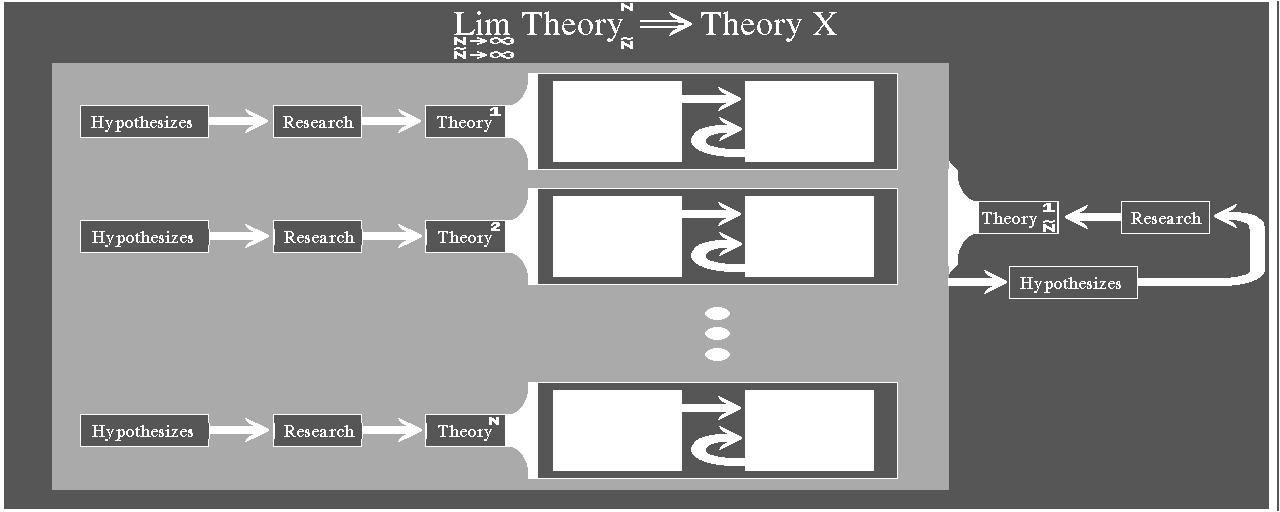
B.2 The Subjective Level
This part concerns only the subjective niveau of 3DA² science, which is the first level that is encountered when dealing with virtual-audio environments. Firstly I define the entities of this level and later the axiom, definition and theorem partitions. Some readers might think that the "Subjective Axioms" are more like "Postulates" or rather "Subjective Postulates" but they oversee that Axioms are stronger in their definition thus making "Subjective Postulates" a weaker entity.
B.2.1 Definition of The Subjective Level
The subjective level of an emerging theory is the part consisting of subjective hypothesizes not yet formed and fluxed by research. Even though the scientific value is low, the basic ideas and postulates are of great interest because they are the foundation that the later theory should grow from. Any inconsistency with other theories are found at this level thus making it rather easy to abolish a pathological theory.
B.2.2 3DA² Constraints : Subjective Axioms
As for most audio ray-tracers there are some constraints, and thus it can't be used in predicting the virtual-audio impulse-response without having the following facts in mind. These are dependant on the heuristic-function (for user defined heuristic-function B.5 and wait for 3DA³) but originally they are the following:
-
The emitted sound is strongly quantized in direction, due to the heuristic function.
-
All model surfaces are plane and smooth.
-
Specular reflections is assumed.
-
Energy addition is assumed.
-
Discontinuances at the edges are discarded.
-
Diffraction, Dispersion, Resonance and Refraction are implemented as a heuristic-function.
-
Partially diffuse sound-field is assumed.
B.2.3 Making Test Models : Subjective Definitions
It is essential to concider such entities of the room that are of great importance when modelling . How does one know what Is important or not (see 2.2) ? The created model is highly subjective and the modeler should probably be more concerned about big objects in the audio-environment than small flowers or tiny insects. Nevertheless this kind of subjectivity is for a novice user rather pathological and should be taken into account when objectively criticizing her. As users get the grip of the essentialities in virtual-audio environments their subjective definitions are more valuable and could, if it is done correctly, transform to a pseudo-objective level (see appendix B.5).
B.2.4 Performing Listening Tests : Subjective Theorems
When the subjective axioms and definitions are outlined and the various calculations are computed, the outcome should be tested on several different types of listeners. It is nearly of no interest using only one kind of listener, such as all the greatest audiophiles that have grown their criticalness against listening test from long ago. Nor is the total use of discotheque visiting people in these tests of great help. The listening-test participants should mirror the entire population with all kind of audio knowledge in order to gain the greatest effect. Nevertheless are the extremes occasionally very important to obtain that specific last piece of theorem that makes the whole theory valid.
B.3 Definition of Objectivity Operators
In this part I state those entities that helps to transform subjective thoughts to more objective ones. Living with these in all quirks of life is not intended, but when dealing with theory making it is essential to think about them once in a while. Thinking constantly with these operators in mind with a scientific work, is also very hard and could make serious internal problems. Especially if the self-criticism isn't well behaved and not directed on the scientific work.
B.3.1 Objectiveness
The first objectivity operator is of course objectiveness. It is the single most important operator of these. Studying new phenomena that hasn't been previously encountered by the observer, is the first basis of new knowledge in that field. Inevitable there are some problems with no a priori knowledge. Especially when the emerging theory is totally new and no previous knowledge is known. Time like this makes the scientist work very hard, because the only way of being objective is to find some isomorphism in another theory that is well known. Partially there are some isomorphism between all theories and usually a couple of them are the foundation of the new theory. This first stage in a theory evolutionary process is of great importance and the selection of basis theories are imperative. It is not the vast amount of isomorphism that is searched for, but instead the smallest set of theories that can explain the nature of the new theory. If there is an easier way of explaining (theorem proof) and if this explanation (theorem) is consistent with the nature of previously stated postulates, axioms and definitions it should be assumed, this procedure is usualy called "Occams razor". The use of shortest explanations makes a theory light and compact, and thus making it more graspable and useful to other scientists.
B.3.2 Broad-mindedness
Dealing with a new theory is of course very difficult, especially when the "inventors" are close-minded to their own field of science. An occasional brain-storm is of great help when searching for new ideas. This brain-storm has to be triggered by the very fact of being curious of knowing something new and of course all great scientist have this ability. In terms of computer science this brain-storming procedure is a width-first algorithm and an excessive use of it is like watching the water-surface not daring to swim or dive for the deeper knowledge.
B.3.3 Farsightedness
The opposite of the previous operator is the farsightedness ability of a scientist. Taking the same analogy as the previous example, this procedure is a depth-first algorithm. Diving too deep is not recommended, but the interaction between broad-mindedness and farsightedness, the ability to know when to use either of them in a special instance, is the core of human intelligence. Visionaries are very farsighted with their visions, and to be able to make these come true they have to be broad-minded.
B.3.4 Self-criticism
The hardest operator is self-criticism. Being objective is not being self-critic, in a sense that objectiveness is only stating that all sides of a problem is to be looked at. Self-critique is important due to the fact of being a self-confidence booster. Some readers might think the opposite way and to clear the clouds around their heavy heads, the following explanation should be read. The first stage in learning self-critique is not a booster, it is rather the opposite. I agree. When doing self-critique as a part of every days work, it transforms gradually from being a non-booster to a booster effect. This is because the confrontation to everyday self-critique hardens the surface against exterior critique. This hardening against exterior critique boosts oneself self-reliance and makes the emerging theory more solid as a consequence. Mind that I am discussing an emerging theory and not a well known one.
B.3.5 Creativeness
The will to create something new is perhaps the greatest driving-force when "inventing". When dealing with this operator the search for isomorphism is abandoned and the obligatory step-out-of-the-system is made. Looking at a theory from the outside is a rather complicated thing and hasn't to do with the broad-mindedness, because there is no width outside the system, in fact there is no depth either. The imaginary ability of oneself has a strong coloration effect to the extent of successful creativeness. It is based on the metaphors that the individual has collected through the years, and even if the creativeness is not an intellectual act in itself, the implementation of the "created" in the theory is most significantly intellectual. Of course it has to be applicable to other "minds", and the foregoing operators are more or less fixing that. In total, the outcome is probably very mappable to other "minds".
B.3.6 Chaoticness
The use of computers has often raised the following question: "Do we have the ability to calculate this problem in a precise mathematical form and consistent to all laws of nature? ". As a computer scientist I have to come with a hard faced fact, it is impossible even with some esoteric computer that is VERY fast. This computer could be faster than itself in every computing instance, and there would still be problems that it couldn't manage to solve. Well! Why bother with such trivialities then. The true fact that, if everything in the universe would be exact and every piece would "know" (location, velocity, temperature and so on) about all the other pieces in the universe would make it impossible to alter a single attribute in the universe. I am assuming an infinite universe, but even if it isn't infinite the extreme communication between all the pieces would collapse. The next step is to abandon the stated hypothesis and state that the pieces are communicating with their nearest neighbors only. This truly lightens the communications but it also introduces a form of delayed "messages", even if it is propagating with the speed of light. Conjoin the previous with the basic fact of the Universe "Uniformity is Thy Destiny" and the conclusion should be that nearly nothing in the Universe is exact, because it would take infinite time to maintain all the pieces in their "perfect" locations, velocities, temperatures and so on.
Delayed Messages + Uniformity + Exactness -> Paradox

Delayed Messages + Uniformity + Chaoticness -> Truly perceivable

Here I state my postulates.

(1) Nearly nothing in the Universe is exact, except the fundametnal constants.

(2) All mathematics are exact.

(3) Computers are formally exact.

(4) Computers can handle chaotic systems.
Postulate four does not state that computers are chaotic but instead it could be programmed to have some chaoticness. It would be paradoxical to say this, if the computers were not only formally exact but truly exact.
The conclusion of this part is; finding an exact formula or system is only helping to understand the depth of a theory and not explicitly showing the very nature of the problem, it is rather implicit somehow. The creator of a theory is forming her own explicit knowledge in terms of visual impressions and such. These are later filtered through their minds and finally scribbled in a fashion that hopefully someone more than the creator can read and understand. Writing down the essence of the chaotic factors are very hard and probably time consuming, but when concidering the other objectivity operators it might cast a light of complexity when dealing with theories.
B.4 From Subjectivity To Objectivity
In this part I state the transformation from the subjective to the objective level. The definitions are proceeding some general warnings about contamination effects, and finally the extreme cases of formulae and the use of previously defined objectivity-operators are presented.
B.4.1 Definition of The Objective Level
The objective level of an emerging theory is the part consisting of objective hypothesizes formed and fluxed by research and other theories. In stark contrast to the subjective level the scientific value is very significant. The basic ideas and postulates has formed the foundation, making the theory solid on objective grounds. All this depends on wether the researcher incorporates a solid theory-basis or not. Using a theory that is evolving and not yet finished could make the scientist draw faulty assumptions.
B.4.2 Definition of The Pseudo-Objective Level
The pseudo-objective level of an emerging theory is the part consisting of subjective hypothesizes formed and fluxed by objectivity operators. This level is also very scientifically significant. This level is what forms the new theory and a combination with the objective foundation, the complete theory is at hand. If the pseudo-objective level turns out to be consistent with all the existing theories then it is assumed to be totally objective. After such consistency check-up, the theory may be used as a foundation to an evolving theory of someone else. False input gives certainly false output and true input gives discussable output, use your facts with care and your output could be someone else's input.
B.4.3 Contamination Effects
The tangling of computed data is not allowed what so ever. It is usually the case that data is sizeable without having the observers paradox in mind when dealing with computer output. This paradox is a plague that haunts nearly all sciences and states that the scientist can't perform an observation without having it contaminated with her instruments. Nevertheless this paradox has also a clear meaning in computer science and mathematics, it rather has a different shape though. To these sciences the problem of steering the evolutionary process of a theory to her wishes and desire ( "You see what you want to see." ) could lead to erroneous theories. Not using the objectivity operators correctly is precisely stating that the theory is contaminated.
B.4.4 Pathological Computation Experiments
What has one to learn from extreme cases of some calculation procedure? This is a rather big question but the answer could be astonishingly easy. The search for a global formula that has the ability to be exact for the majority of calculations and cases, is rather simple. If one takes the search for pathological cases, such as forcing the calculations to behave at their worst, the understanding of the formula is enhanced. Checking the behavior of these formula with the theory, stated as foundation to these calculations, could pinpoint any inconsistency within the theory and perhaps the formula. This work is one of the most time consuming parts in theory making, because the extreme cases are not always evident and could take considerable time to find. When finally found it could spoil the entire theory and the scientist has to begin from the beginning.
B.4.5 The Use of Objectivity Operators
When using the objectivity operators it has to be stated that there is no one-way-only thinking, and that the following is just a mere reflection of my use of them. Firstly the visionary-part (farsightedness) is working, making a far away purpose consisting of several "fantasies". After this, the self-criticism checks if the "fantasies" could be realized and some loops in the brain-storming (broad-mindedness) procedure affirms any answer. Now it is time to be objective and penetrate the ideas from every aspect of other theories and combine it with the creativeness as far as it goes. Jumping between operators in a non-descriptive way is then performed to evolve the theory. Usually when hitting a hard cracked problem within the theory, the selection of a different operator is performed and used. Selecting is done like the prime heuristic at which the theory began to evolve.
B.5 The Heuristics Objectivity-transform Notation
When forming 3DA² theory the use of the Log and Cog is essential. Of course this is only the smallest set of necessity, in order to have some idea of the theory at all. It is therefore not forbidden to enhance the Log and Cog content and outline.
B.5.1 Basic Heuristic Template
The basic template of a 3DA² subjective axioms, definitions and theorem sheet is specified below. All 3DA² sessions that end up as basis to 3DA² theory should have explicitly written templates in order to track flaws or breakthroughs.
Ray distribution:
Three dimensional distribution of rays along with their intensity variation. Directivity of sender/receiver could be inserted into this distribution. Description of the distribution should be done in mathematical notation.

Heuristic ray distribution:
Heuristic distribution of rays along with their intensity variation.  Description of this distribution should be done in clear and concise English. If any formula is used it should be written down.

Reverberation truncation:
Stating what kind of reverberation estimation was used and where truncation limit was set, if any.

Diffusion heuristic:
Basic idea of diffusion heuristics, represented in plain English and mathematical expressions.

Diffraction heuristic:
Basic idea of diffraction heuristics, represented in plain English and mathematical expressions.

Frequency split up:
Number of bands and how they are separately calculated in the above heuristics, if they are.

Phase heuristic:
Basic idea of phase heuristics, represented in plain English and mathematical expressions. This heuristic is introducing the ability to consider the energy addition as pressure additions. It could be very tempting to think that it IS really pressure additions therefore it should be specified that it isn't.
B.5.2 The Log : Subjective Premisses
The Log is the virtual-audio environment stated in plain English. Also the heuristic template is a member of the Log and should precede the model explanation. Finishing the Log is the purpose and the expectations of the specific session.
B.5.3 The Cog : Subjective Clauses
The Cog consists of answers to the Log questions, and each for every person attaining the listening test. The attendees shouldn't know the expectations, in order to minimize contamination effects. At the end a report on these answers against the expectations should be done, naturally it should be written by the Log writer.
B.5.4 Pseudo-Objective Clauses
The next step of action is using the objectivity operators on the Cog and forming a new Log with better coherency between intent and expectation. As these listening tests proceed and the intent and expectation is approaching each other and maybe coincide, the Cog can be incorporated into 3DA² theory.
Appendix C: 3DA² ARexx Programming
"Esse non videri"
Fredrik The Great
This appendix is only concerning the ARexx key-words and their definitions. It is not a survey of the ARexx language because there are books already written on this topic.
C.1 Audiotrace
This keyword handles all the tracer functions, wether it's for setting purposes or the actual trace procedure. The programmable heuristic-ray-trace algorithm is accessible from this keyword.
C.1.1 Settings
First sub-keyword is the "settings", which has the tracer foundation variables in its domain. These are the main speed factors in the ray-tracing and usually the user could estimate the resulting speed from these settings. Note: The speed could be very ambiguous if the heuristic function is written in the aspect of not having the chaotic factors in mind (see appendix B).
C.1.1.1 Big_Data
The generated data is fully preserved with its intensity, time, travelled path-length and the impact vector. Furthermore the source- and receiver-point names are stored in text form.
C.1.1.2 Small_Data
The generated data is preserved with its intensity, time and source- and receiver-point names in numerical form.
C.1.1.3 Ray_Density
From either source or receiver, depends if the user is forward- or backward-tracing, the amount of radiated rays from these that will establish the later computed echogram, is set with this keyword.
C.1.1.4 Reverberation_Accuracy
This keyword sets the echogram truncation-limit. It is set in percent of the total echogram time. The echogram time length is calculated with Sabins formula. Shorter echogram makes faster auralizer calculations.
C.1.1.5 Specular_Depth
This keyword sets the maximum amount of reflections and it's a good idea not having it too deep ( n=50 is very deep in some occasions, especially if the model is very clustered or detailed).
C.1.1.6 Diffusion_Accuracy
This keyword sets the percentage of diffusion-rays, in every reflection that will be computed. Total diffusion-rays is a base at these computing instances. This is certainly very dependant on the users heuristic ray-trace-function. The diffusion could be applied afterwards, but that is making the assumption that every material has the same diffusion characteristics. Which certainly isn't true at all.
C.1.1.7 Diffraction_Accuracy
This keyword sets the percentage of diffraction-rays that will be computed (ray passing an edge or a corner). Total diffraction-rays is a base at these computing instances. This is certainly very dependant on the users heuristic ray-trace-function. The diffraction could be applied afterwards, with special edge and corner objects, and then traced again. The latter solution is of interest if the user want's to obtain only the diffraction parts of the ray-trace calculations.
C.1.1.8 Frequency_Accuracy
This keyword sets the percentage of frequency split rays in every reflection that will be computed. Total number of frequency bands (normally 10) is used as a base. This is certainly very dependant on the users heuristic ray-trace function.
C.1.1.9 Phase_Accuracy
This keyword sets the percentage of rays that will use the objects material phase-dependency when encountering objects trough their propagation. It depends heavy on the previous Frequency-Accuracy setting. This is certainly very dependant on the users heuristic ray-trace function.
C.1.1.10 All
This keyword sets nearly all the previous setting variables for the main-keyword Audiotrace.
C.1.2 Forward
When all settings are done and the user wants to audio-trace the virtual-audio-model she can forward-trace it. That is doing the audio-trace calculations from the source to the receiver.
C.1.3 Backward
When all settings are done and the user wants to audio-trace the virtual-audio-model she can backward-trace it. That is doing the audio-trace calculations from the receiver to the source.
C.1.4 Full
When all settings are done and the user wants to audio-trace the virtual-audio-model she can make a full-trace. That is doing the audio-trace calculations from both the source and receiver to the receiver and source. This helps consistency check-up on the user heuristic-function. If the answer is of the same appearance in the forward mode as in backward mode the user is dealing with an appropriate ray-trace heuristic-function. If not, the heuristic function should be checked and corrected. The corrections shall be written as remarks in the heuristic source-code, stating the problem and the solution (see appendix B).
C.1.5 All
If the user wants a total trace, i.e. every sender and receiver are participating in the ray-trace calculation the "All" keyword does the trick. Note: No names needed.
C.2 Auralize
This keyword handles all the auralizer commandoes, wether it's for setting purposes or the actual auralizing procedure. The programmable auralizer algorithm is accessible from this keyword.
C.2.1 Settings
The first sub-keyword is "settings", which has the auralizer parameter variables in its domain. These are the main speed factors in the auralizer procedure and usually the user could estimate the resulting calculation speed from these settings. Note: The speed isn't ambiguous like the heuristic function in the ray-tracing procedure. Nevertheless a faulty auralizer programming would make the wrong convolution and thus it would make the resulting data very ambiguous.
C.2.1.1 Dirac_Sample_Frequency
The dirac-sample (echogram), used in the auralizing procedure (convolution), sample-frequency is settable to any sample-frequency.
C.2.1.2 Sound_Sample_Frequency
The resulting sound-sample, resulting from the auralizing procedure (convolution), sample-frequency is settable to any value.
C.2.1.3 Dirac_Sample_Data_Width
The dirac-sample, used in the auralizing procedure (convolution), data-width is settable to any data width. Note: Use only 2^n^ bit width.
C.2.1.4 Sound_Sample_Data_Width
The resulting sound-sample, used in the auralizing procedure (convolution), data-width is settable to any width. Note: Use only 2^n^ bit width.
C.2.2 Forward
When all settings are done and the user wants to auralize a ray-traced virtual-audio-model she can use the forward ray-trace data directed to the auralizer procedure.
and
C.2.3 Backward
When all settings are done and the user wants to auralize a ray-traced virtual-audio model she can use the backward ray-trace data directed to the auralizer procedure.
and
C.2.4 Full
When all settings are done and the user wants to auralize a ray-traced virtual-audio-model and she wants to auralize it with both the forward and backward ray-trace-data she can use the "full" key-word.
and
C.3 Clear
This keyword handles all the data-clear functions which are used when the user wants to dispose data. Note: This keyword doesn't invoke the affirmation window, wether the user is really going to dispose valuable data or not.
C.3.1 Drawing
The following example shows how the user should make a clean drawing-model with no objects in the virtual-audio-model. Note: This keyword doesn't invoke the affirmation window, wether the user is really going to dispose valuable data or not.
C.3.2 Objects
The following example shows how the user should make a clean object-stock with no objects in it. This means that the user must retreive a new object-stock from secondary storage (see C.9.2) to make it possible modelling. Note: This keyword doesn't invoke the affirmation window wether the user is really going to dispose valuable data or not.
C.3.3 Materials
The following example shows how the user should make a clean material-stock with no materials in it. This means that the user must retreive a new material-stock from secondary storage (see C.9.3) or create new materials using "Material Create ..." (see C.10.1) to make it possible to model. Note: This keyword doesn't invoke the affirmation window, wether the user is really going to dispose valuable data or not.
C.3.4 Flights
The following example shows how the user should make a clean flight-stock with no flight-path in it. If the model is of static nature, i.e. all objects are fixed and not movable, these flight-paths is non usable. It depends on the amount of primitive-flights, that the user normally load at start-up, but it usually takes a considerable amount of memory. If the model is static this keyword makes a memory dependant system less dependant. Note: This keyword doesn't invoke the affirmation window, wether the user is really going to dispose valuable data or not.
C.3.5 Audiotraces
The following example shows how the user should erase all computed trace-data (both forward- and backward-trace-data). Note: This keyword doesn't invoke the affirmation window, wether the user is really going to dispose valuable data or not.
C.3.6 Echograms
The following example shows how the user should erase all the normalized echograms associated to the virtual-audio-modell. Note: This keyword doesn't invoke the affirmation window wether the user is realy going to dispose valuable data or not.
C.3.7 All
The following example shows how the user should erase all data associated to the virtual-audio modell. Note 1: This keyword doesn't invoke the affirmation window, wether the user is really going to dispose valuable data or not. Note 2: This erases all data.
C.4 Displacement
This key-word handles the displacement functions of various data components, i.e. small specific changes with the previous data as a relative base in the calculation. Using this keyword and assigning a flight-path makes the virtual-audio environment automatically dynamic. Making the model dynamic, is making the computation effort more demanding because the necessity of computing new echograms in every instance is needed.
C.4.1 Time
This sub-key-word handles the time variations, which is used with a dynamic virtual-audio model. The time is directly linked to the objects flight-path and it is explicitly computed, thus making it possible to have nondirectional time (i.e. forward in time could also mean backward in time). To obtain a normal mapping, to our perception of time, the user should choose between two directions, forward or backward.
C.4.1.1 Forward
When using the forward as an ending key-word, the time is forced forward, making a normal time-lapse.
C.4.1.2 Backward
When using the backward as an ending key-word, the time is forced backwards, making it possible to go back in time. Scientifically this isn't a compliant solution according to normal behavior of our environment. This makes all derivation from backward time simulation partially wrong. Nevertheless this makes the ability to make nonlinear and nondirectional time solutions. These solutions could be used in a non-natural time environments, probably most useful when doing science-fiction work. When using 3DA² this way, the user must state that the simulation has no natural nature-equivalent, in our sense of perception.
C.4.2 Object
This sub-key-word handles the objects position, size and orientation variations, which is used in a dynamic virtual-audio model.
C.4.2.1 Position
Using this ending key-word makes a position-displacement of a particular object, relative to its current position in space.
C.4.2.2 Resize
Using this ending key-word makes a size-displacement of a particular object, relative to its current size.
C.4.2.3 Orientation
Using this ending key-word makes a rotation-displacement of a particular object, relative to its current orientation in space. The rotating order is x, y then z.
C.4.2.4 PSO
Using this ending key-word makes a position, size and orientation displacement of a particular object, relative to its current position, size and orientation in space. The rotating order is x, y then z.
C.4.3 Material
This sub-key word handles the material frequency-, phase- and directivity displacements of a particular material. Changes are relative to current values (compare with C.10.2). Forming a material with a dynamic frequency-, phase- and directivity response makes it possible to obtain a more realistic material behaveuor. Please read the Introduction unit, for further explanation.
C.4.3.1 Frequency
If the last key-word is "frequency", the displacements are mapped on the material frequency response.
C.4.3.2 Phase
If the last key-word is "phase", the displacements are mapped on the material phase response.
C.4.3.3 Directivity
If the last key-word is "directivity", the displacements are maped on the material directivity characteristics. Note: Current version have only three directivity modes (0 = omni, 1 = Bi, 2 = Cardioid), thus making greater displacements than ±1 useless.
C.4.4 Flight
This sub-key-word handles the flight-path position, size and orientation variations, which is used in a dynamic virtual-audio model. Normally this isn't common, because the flight-paths should be generated correctly from the start using an appropriate flight-path generator. When checking the consistency of the virtual-audio-environment it is necessary to make small displacements that will reveal possible problems with the heuristic ray-trace function. Note: This is only to be used when checking the model-to-nature consistency.
C.4.4.1 Position
Using this ending key-word effects a particular flight-path origin position displacement relative to its current position in space.
C.4.4.2 Resize
Using this ending key-word effects a particular flight-path size displacement relative to its current size.
C.4.4.3 Orientation
Using this ending key-word effects a particular flight-path orientation relative to its current orientation in space. The rotating order is x, y then z.
C.4.4.4 PSO
Using this ending key-word effects a particular flight-path position, size, orientation relative to its current position, size and orientation in space. The rotating order is x, y then z.
C.5 Drawing_To_Object
When doing a set of automatic generated objects this key-word makes the current drawing-model to an object. Note: This command doesn't clear the current drawing-model, in order to make it possible to build from the current object with new objects or/and displacing/disposing old ones.
C.6 Echogram
This keyword handles all the echogram functions, wether it is for setting purposes or the actual echogram normalizing procedure.
C.6.1 Settings
The sub-key-word "Settings" is used when changing normalizing method in the normalize echogram procedure.
C.6.1.1 No_Normalize
No normalization is performed on the computed echogram. Thus making the levels raw. When used in auralization-convolution, the result from that is always bad, due to the loss of least significant bits. This setting is only used when the user wants fast calculations and nothing else.
C.6.1.2 Linear_Normalize
Normalization is performed on the computed echogram. The loss of least significant bits, critical to the auralization procedure, are suppressed with this ending key-word. This is the normal setting and the use of the echogram normalized with "Linear_Normalize" is the appropriate one.
C.6.1.3 Exp_Normalize
Normalization is performed on the computed echogram in a non linear fashion. In order to make normalization of the echogram more compliant to the human ear, i.e. the ear inertia (integration), a laboratorial setting as this one is used.
C.6.2 Forward
Computing an echogram from a specific sender to a specific receiver is done as follows.
and
C.6.3 Backward
Computing an echogram from a specific receiver to a specific sender is done as follows.
and
C.6.4 Full
Computing an echogram from a specific receiver to a specific sender and vice versa is done as follows. Note: This is usually used in consistency check-up.
and
C.7 Echogram_weight
When computing "CLARITY" and other acoustical criteria this key-word is of great help. It calculates the weight of the echogram with user specific functions.
C.7.1 Forward
Computing the echogram-weight from a specific sender to a specific receiver should be done as follows.
and
C.7.2 Backward
Computing the echogram-weight from a specific receiver to a specific sender should be done as follows.
and
C.7.3 Full
Computing the echogram-weight from a specific receiver to a specific sender and vice versa is done as follows. Note: Used in consistency check-up.
and
C.8 Flight
This key-word is handling the drawing-objects flight-path assignments and formation methods.
C.8.1 Change
This sub-key-word handles the flight-path position, size and orientation variations, which is used in a dynamic virtual-audio model. Normally this isn't common, because the flight-paths should be correctly generated from the start using an appropriate flight-path generator.
C.8.1.1 Origin_Position
Using this ending key-word forces a particular flight-path origin-position to a specific position in space.
C.8.1.2 Size
Using this ending key-word makes a particular flight-path assume the specified size.
C.8.1.3 Orientation
Using this ending key-word makes a particular flight-path orientation rotate to a specific angle. The rotating order is x, y then z.
C.8.1.4 PSO
Using this ending key-word makes a particular flight-path position, size, orientation change. The rotating order is x, y then z.
C.9 Load
Retrieving previously computed, manufactured or procured data of drawings, objects, materials, flight-paths, audio-traces or echograms is done with this key-word.
C.9.1 Drawing
Retrieving a virtual-audio model is done with this sub-key-word.
C.9.2 Objects
Retrieving a set of modelling objects is done with this sub-key-word.
C.9.3 Materials
Retrieving a set of materials is done with this sub-key-word.
C.9.4 Flights
Retrieving a set of flight-paths is done with this sub-key-word.
C.9.5 Forward
This sub-key-word handles the forward-computation data-retrieve environment.
C.9.5.1 Audiotrace
Retrieving a forward audio-trace is done with this ending-key-word.
C.9.5.2 Echogram
Retrieving an echogram based on forward computation is done with this ending-key-word.
C.9.6 Backward
This sub-key-word handles the backward-computation data retrieve environment.
C.9.6.1 Audiotrace
Retrieving a backward-audio-trace is done with this ending-key-word
C.9.6.2 Echogram
Retrieving an echogram based on backward computation is done with this ending-key-word.
C.9.7 Full
This sub-key-word handles the computation data-retrieve environment. It is used mainly in consistency check-up, forward- against backward-tracing. Instead of using two commando lines (Load Forward x n and Load Backward x n) it uses only one line (Load Full x n) and thus it makes the retreive system more secure against typing errors and such.
C.9.7.1 Audiotrace
Retrieving a full calculated audio-trace is done with this ending-key-word.
C.9.7.2 Echogram
Retrieving an echogram based on both forward and backward computation is done with this ending-key-word.
C.10 Material
This key-word is handling the materials with their corresponding type and frequency-, phase- and directivity-dependance.
C.10.1 Create
Creating a material is done with this sub-key-word. Usually it is more convenient to create them in the materials text-form file (see A.3) and then retrieved with the "Load" key-word (see C.9.3).
C.10.2 Change
Altering an already created material is done with this sub-key-word. This is an absolute change and the previous setting is not used (compare C.4.3).
C.10.2.1 Frequency
Changing the material absorption-response is done with this ending key-word.
C.10.2.2 Phase
Changing the material phase-dependency is done with this ending key-word.
C.10.2.3 Directivity
Changing the material directivity is done with this ending key-word.
C.10.2.4 Type
Changing the type of the material is done as follows.
C.10.2.5 Color
Changing the visual color (used in solid 3D environments) of a specific material is done like this.
C.10.2.6 Volume
Changing the sender Energy level or the receiver energy sensitivity is done as follows.
C.11 Measure
The default measuring-unit is always in meter, altering the measure unit from this default is done with this keyword.
C.11.1 Meter
For those who are more used to the metric system the following setting is the appropriate. If the 3D modeller is running, the grid is shown.
C.11.2 Feet
For those whot are more used to the English inch-system the following setting is the appropriate. If the 3D modeller is running, the grid is shown.
C.11.3 Off
If the 3D modeller is running and the user doesn't want the grid to show the following is the appropriate setting. Note: The measure unit is in meter if the user doesn't call "Measure Feet", when continuing the modelling work.
C.12 Merge
Retrieving previously computed, manufactured or procured data of drawings, objects, materials, flight-paths, audio-traces or echograms and combining it with the existing data is done with this key-word. When splitting the workload to several people this comes in handy when the virtual-environment system supervisor is combining the efforts.
C.12.1 Drawing
Combining a virtual-audio-model is done with this sub-key-word.
C.12.2 Objects
Combining a set of modelling objects is done with this sub-key-word.
C.12.3 Materials
Combining a set of materials is done with this sub-key-word.
C.12.4 Flights
Combining a set of flight-paths is done with this sub-key-word.
C.13 Object
This key-word handles the objects position, size, orientation, material- and flight-path-assignments. Furthermore the user can create objects of her own. The use of normal object insertion and finally "Drawing-To-Object" (se C.5) with the following of "Clear Drawing" is a far more convenient way of doing new objects.
C.13.1 Position
Using this sub-key-word moves a particular object to a specific position in space.
C.13.2 Size
Using this sub-key-word makes a particular object assume the specified size.
C.13.3 Orientation
Using this sub-key-word makes a particular object rotate in space to these specific angles . The rotating order is x, y then z.
C.13.4 PSO
Using this ending key-word makes the object position, size, orientation change absolutely. The rotating order is x, y then z.
C.13.5 Insert
Inserting a new object in the audio-environment is performed like this.
C.13.6 Material
Assigning a specific material to a particular object is done as follows.
C.13.7 Flight
Assigning a specific flight-path to a particular object is done as follows. Note: The virtual-audio-model is dynamic after doing this. Using this keyword and assigning a flight-path makes the virtual-audio environment automatically dynamic. Making the model dynamic, is making the computation effort more demanding because the necessity of computing new echograms in every instance is needed.
C.14 Preferences
This key-word is handling the directory-path and visual color palette settings. Preferably the user should have them in the beginning of an ARexx script. See A.5 for path examples.
C.14.1 Drawingpath
Altering the default directory, where the drawings are stored, is done with this sub-key-word.
C.14.2 Objectspath
Altering the default directory, where the modelling objects are stored, is done with this sub-key-word.
C.14.3 Materialspath
Altering the default directory where the materials are stored, is done with this sub-key-word.
C.14.4 Flightspath
Altering the default directory, where the object flight-paths are stored, is done with this sub-key-word.
C.14.5 Audiotracepath
Altering the default directory, where the computed audio-traces are stored, is done with this sub-key-word.
C.14.6 Echogrampath
Altering the default directory, where the computed echograms are stored, is done with this sub-key-word.
C.14.7 Samplepath
Altering the default directory, where the samples (both auralized and normal) are stored, is done with this sub-key-word.
C.14.8 Color
Altering the default visual colors is done with this key-word.
C.15 Quit
Ending a session with 3DA² through ARexx is done with this key-word. Usually this way is the most common but the use of the window close gadget is also allowed. Using the ARexx visual "Show View" is automatically invoking a window with a closing gadget. Note: No affirmation requesters appears when quiting and the program is NOT storing any changes done in the data-stocks.
C.16 Sample
Doing mixing work on computed samples is done with this key-word.
C.16.1 Simple_Mix
Plain sample mixing is done with this sub-key-word.
C.16.2 Over_Mix
Plain sample mixing at special timing is done with this sub-key-word.
C.16.3 Make_Stereo
Making one stereo sample with two mono samples is done with this sub-key-word.
C.16.4 Length
Sample length in seconds is retrieved with this sub-key-word.
C.16.5 Delete
Samples that wont be needed anymore could be deleted using this sub-key-word.
C.17 Save
Storing computed and manufactured data of drawings, objects, materials, flight-paths, audio-traces and echograms is done with this key-word.
C.17.1 Drawing
Storing a virtual-audio-model is done with this sub-key-word.
C.17.2 Objects
Storing a set of modelling objects is done with this sub-key-word.
C.17.3 Materials
Storing a set of materials is done with this sub-key-word.
C.17.4 Flights
Storing a set of flight-paths is done with this sub-key-word.
C.17.5 Forward
This sub-key-word handles the forward-computation data-store environment.
C.17.5.1 Audiotrace
Storing a forward audio-trace is done with this ending-key-word.
C.17.5.2 Echogram
Storing an echogram based on forward calculation is done with this ending-key-word.
C.17.6 Backward
This sub-key-word handles the backward computation-data store-environment.
C.17.6.1 Audiotrace
Storing a backward audio-trace is done with this ending-key-word.
C.17.6.2 Echogram
Storing an echogram based on backward calculations is done with this ending-key-word.
C.17.7 Full
This sub-key-word handles the computation-data store-environment. It is used mainly in consistency check-up, forward- against backward-tracing. Instead of using two commando lines (Save Forward x n and Save Backward x n) it uses only one line (Save Full x n) and thus it makes the store system more secure against typing errors and such.
C.17.7.1 Audiotrace
Storing a fully calculated audio-trace is done with this ending-key-word.
C.17.7.2 Echogram
Storing an echogram based on both forward and backward computation is done with this ending-key-word.
C.18 Screen
If the user have started more than one 3DA² session the flipping of screens are made easy with this key-words. To obtain a 3D environment with special glasses, the user have to start two 3DA² sessions with ARexx only.
C.18.1 Show
Using this sub-key-word puts the 3DA² screen front most.
C.18.2 Hide
Using this sub-key-word puts the 3DA² screen rear most.
C.19 Show
This key-word is handling the 3D visualizer when controlling 3DA² from ARexx. There is a greater 3D effect if the user have two 3DA² sessions running simultaneously. These should show the model from different view-points and toggling the screens with "Screen Show". Note: The user have to have special glasses that alternately passes the CRT picture.
C.19.1 View
This sub-key-word is handling the specific view-points and lens settings. Consecutive calls to these are not recommended, because the amount of time spent in ARexx decoder is enormous. If the user wants to do an animation she would benefit greatly using the "3D-Flight" sub-key-word (see C.19.6).
C.19.1.1 From
This ending-key-word sets the position of the eye in 3D space.
C.19.1.2 To
This ending-key-word sets the position of the view-point in 3D space.
C.19.1.3 Tilt
This ending-key-word is used when tilting the model off its normal rotation in space. Rotating order is x, y then z.
C.19.1.4 Magnification
This ending-key-word handles the viewing lens magnification-factor.
C.19.1.5 Perspective
This ending-key-word handles the viewing lens focal-distance.
C.19.1.6 3D
This ending-key-word indicates that the view is set to all the above mentioned properties.
C.19.2 XY
This sub-key-word rotates the model to the following position: X axis to the right, Y axis upwards and the Z axis towards the user.
C.19.3 XZ
This sub-key-word rotates the model to the following position: X axis upwards, Z axis to the right and the Y axis towards the user.
C.19.4 YZ
This sub-key-word rotates the model to the following position: Y axis to the right, Z axis upwards and the X axis towards the user.
C.19.5 Bird
This sub-key-word places the lens in the first octant, with the viewpoint towards the origin.
Show Bird
C.19.6 3D_Flight
This sub-key-word is handling the animation sequences. Note: Use this instead of consecutive calls to "View".
C.19.6.1 In
This ending_key-word lets the user make a zoom in to the model.
C.19.6.2 Out
This ending_key-word lets the user make a zoom out from the model.
C.19.6.3 Elevate
This sub-key-word handles the model elevation process. Usually it is used for initial walk and run conditions, in the model environment.
C.19.6.3.1 Up
This ending_key-word elevates the model up from the horizon.
C.19.6.3.2 Down
This ending_key-word elevates the model down to the horizon.
C.19.6.4 Circulate
This ending_key-word is handling the circulation flight over the model.
C.19.6.5 Walk
This key-word is handling the walk and run conditions after initializing with elevate (see C.19.6.3).
C.19.6.5.1 To
This ending_keyword makes "the walk" to a desired location facing the new location.
C.19.6.5.2 From
This ending_keyword makes "the walk" to a desired location facing the previous location.
C.19.6.6 Path
This ending_key-word is used when the user wants to fly a specific flight_path that is assigned to a particular object in the audio_model.
C.20 Sort
This key-word is handling the sorting of the drawing_, object_, material_ and flight_stocks. Note: Usually this is not needed in 3DA² ARexx sessions.
C.20.1 Drawing
This sub-key-word sorts the drawing_stock. Note: Usually this facilitates when modelling.
Sort Drawing
C.20.2 Objects
This sub-key-word sorts the object_stock. Note: Usually this facilitates when modelling.
Sort Objects
C.20.3 Materials
This sub-key-word sorts the material_stock. Note: Usually this facilitates when modelling.
C.20.4 Flights
This sub-key-word sorts the flight_stock. Note: Usually this facilitates when modelling.
C.21 Special_FX
This keyword handles the special effects. Commonly used when a computing session is started or finished.
C.21.1 Flash
This sub-key-word makes a color to flash.
C.21.2 Fade
This sub-key-word handles the color fading procedures.
C.21.2.1 In
This sub-key-word makes a color fade from black to the desired color.
C.21.2.2 Out
This sub-key-word makes a color fade from a desired color to black.
C.21.2.3 All
This sub-key-word is used when the user wants to fade all visual colors on screen.
C.21.2.3.1 In
This ending_key-word makes all colors fade from black to the desired colors.
C.21.2.3.2 Out
This ending_key-word makes all colors fade from a desired colors to black.
C.21.3 Play_sound
This key-word is used when the user wants an audible affirmation from 3DA² computation. Note: The sample is preferably placed in the sample_path.
Appendix D: Icon Map
D.1 Drawing Icons


The default drawing icons, with the text edit data version to the left and the memory and speed optimized data version to the right.
D.2 Objects Icons


The default objects icons, with the text edit data version to the left and the memory and speed optimized data version to the right.
D.3 Materials Icons


The default materials icons, with the text edit data version to the left and the memory and speed optimized data version to the right.
D.4 Flights Icons


The default flight icons, with the text edit data version to the left and the memory and speed optimized data version to the right.
D.5 Traced Data Icons


The default traced data icons, backward traces are left most and forward traces are right most, with the text edit data versions to the left and the memory and speed optimized data version to the right. These data files could be edited with a normal text editing program but shouldn't. Cause: Contamination effects of input data that could entirely spoil the auralized result and thus make wrong clauses about virtual audio environments. Also remember that your heuristic function could be chaotic in its appearance.
D.6 Echogram Icon


The default echogram icon, the data file could be edited with a sample editing program but shouldn't. Cause: Contamination effects of input data that could entirely spoil the auralized result and thus make wrong clauses about virtual audio environments, even if the convolution function is of non-chaotic type.
D.7 Auralized Sound Icon


The default auralized sound icon, the data file could be edited with a sample editing program but shouldn't. Cause: Tampering with output data strongly spoils every scientific value, even if it is a small change.
D.8 Preferences File Icon


The default preferences file icon, the data file could be edited with a normal text editing program or the data could be altered from 3DA² preferences window.
Appendix E: Window Map
E.1 3D-View & Edit Window
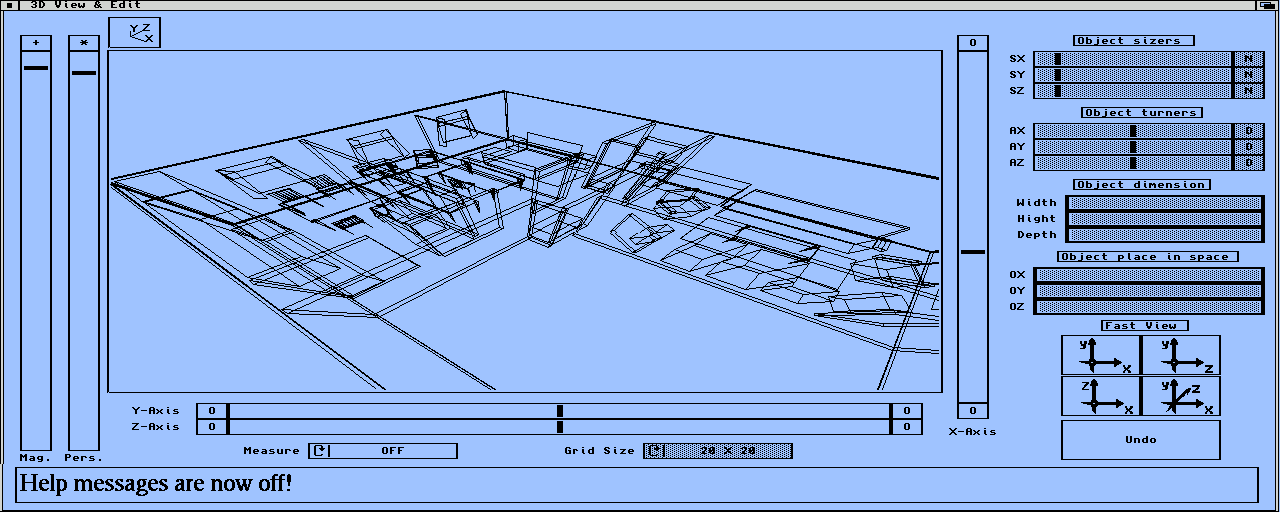
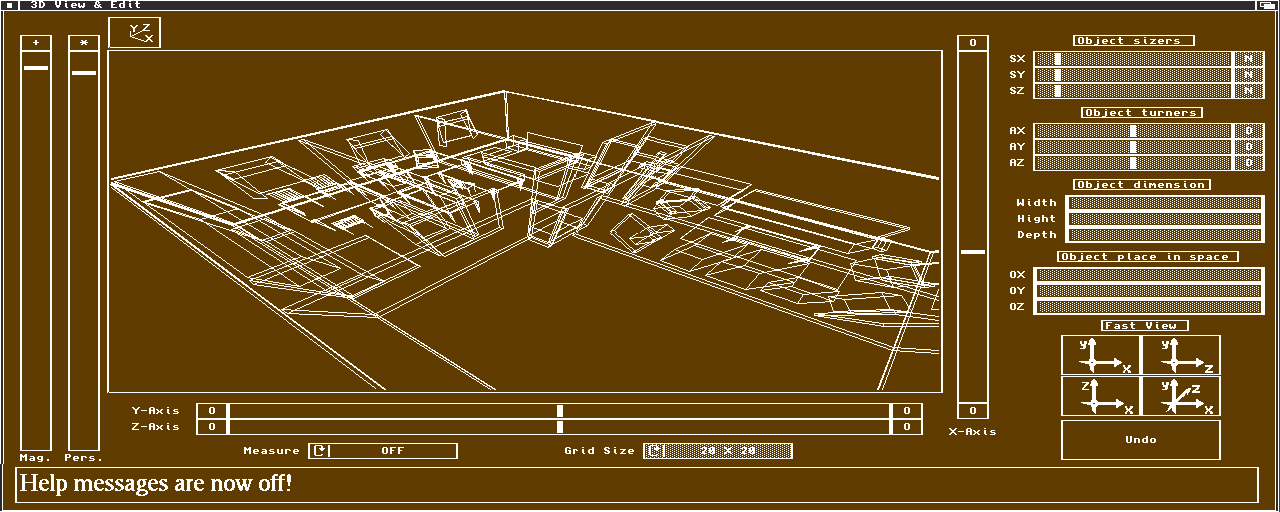
This window is the main 3D modeler window. Nearly every action in this window alters the calculated result. Common rotations, zooming and perspective changes are not acting on the result of course. In this window the help messages are printed, if the user wants them printed at all.
E.2 Drawing Stock Window


This window has all the objects that are a part of the model and from this window the user can access the object-, material and flight-stock windows.
E.3 Object Stock Window


This is the object-stock window where the user fetches objects that she wants to place in the main model.
E.4 Material Stock Window


This window handles all the materials and the user can invoke the characteristics window from here.
E.5 Flight Stock Window


This window handles all the flight-paths that could be assigned to the audio model-objects. Making the model dynamic, is making the computation effort more demanding because the necessity of computing new echograms in every instance is needed.
E.6 Characteristics Window


This window handles all material proprieties. The frequency-, phase- and directivity-dependency among the visual modelling color. Also the special name and type are changeable.
E.7 Tracer, Echogram & Convolver Window


This window handles mostly the tracer settings and the computer panel. It is only for the visual part, showing the normalized echogram and computed energy hits. For those more complex auralization problems the ARexx approach is highly recommended. Replaying auralized sound samples could be done with either a common sampler or with the Amiga custom-chip sound.
E.8 Preferences Window


The preferences window handles the 3DAudio.preferences file in the 3DA-Prefs drawer. Editing in this window is entirely mouse driven but it could also be edited by keys. Another way of editing these settings, is to get the 3DAudio.preferences file in to a normal editor and edit it by hand. The last procedure is not recommended although.
E.9 3DA² About Window


This window shows what program version you are running. Current status of drawing as an enlightening over the computation time. Current object-, material-, flight-stores are also showed. Naturally are the memory available and the ARexx port-name also placed here.
E.10 Main Window Map
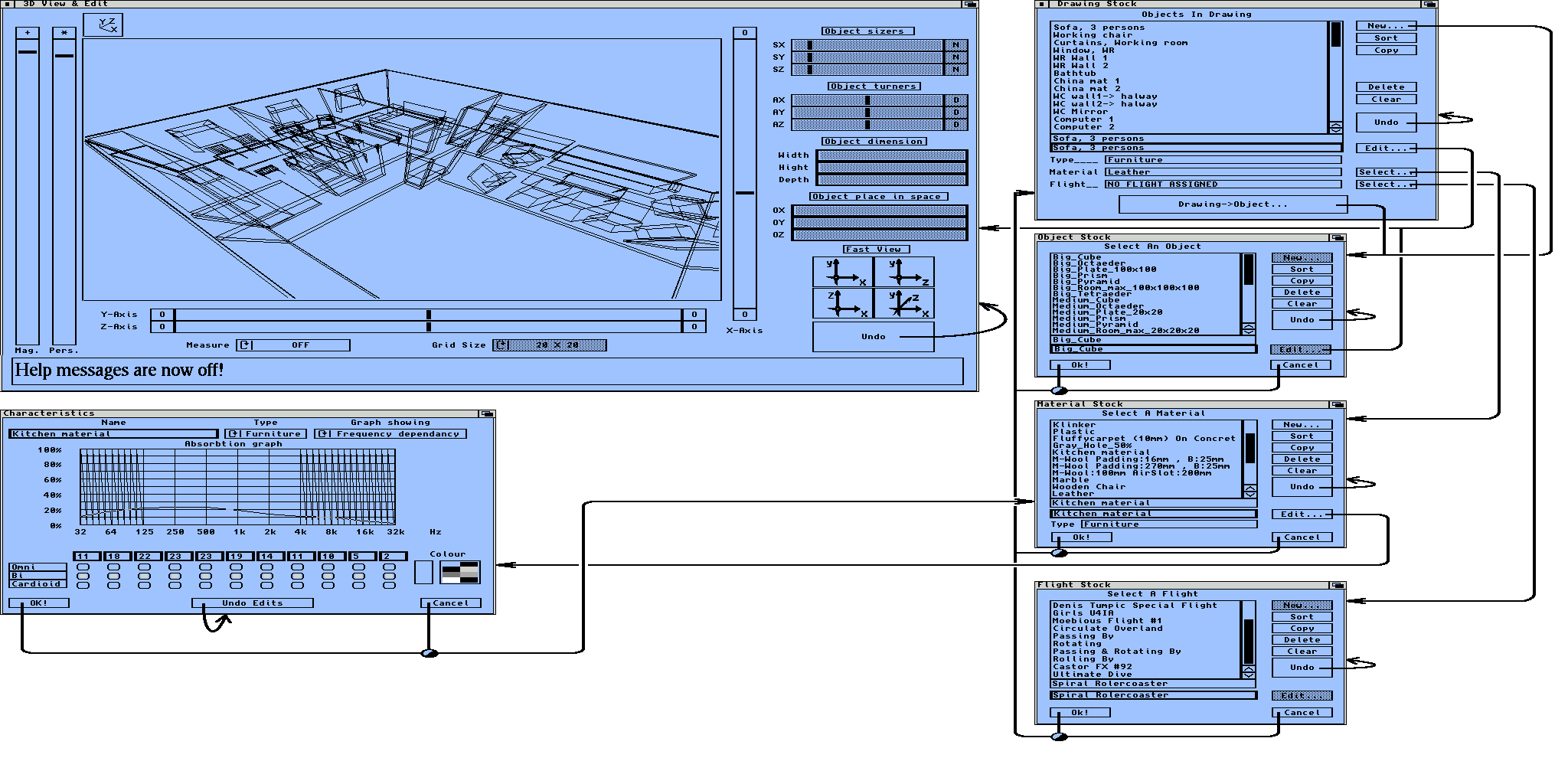
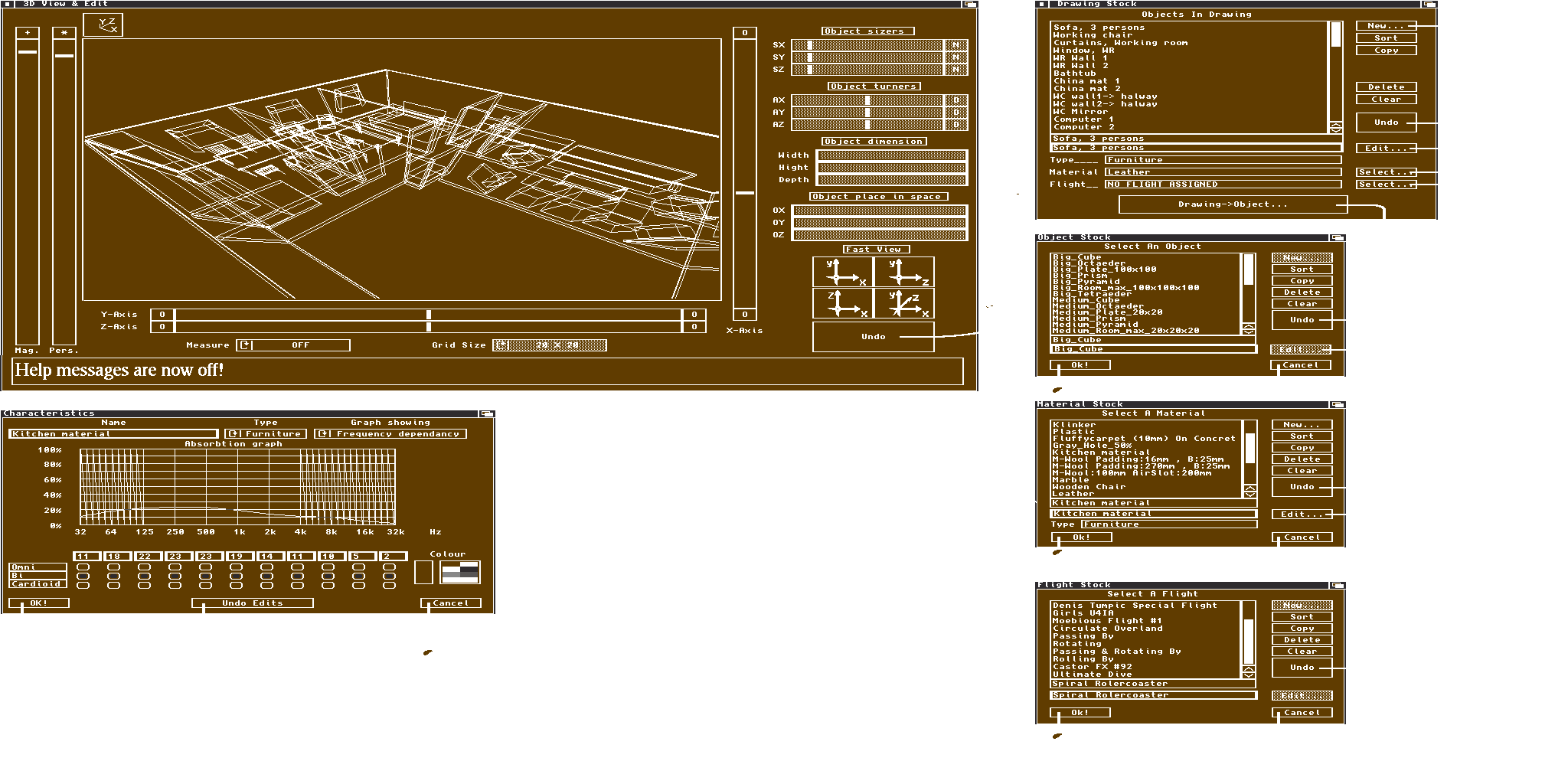
This graph shows the communication between the modeler windows. The arrows are the routs. When several gadgets have the same route, but different affirmation-data, the connections are connected with a black and white bulb.
Appendix F: Menu Map
F.1 Project Menu


This is the main menu for retrieving, merging and storing data files. The "About" window is also invoked from this menu. Ending a 3DA² session is done with the "Quit" menu-item.
F.1.1 Open Submenu


Retrieving previously computed, manufactured or procured data of drawings, objects, materials, flight-paths, audio-traces or echograms is done with this submenu. Typing errors in the data files are passed with a notification window. No need to remember what type, forward- or backward-calculation. The trace and echogram data-retriever is automatic.
F.1.2 Merge Submenu


Retrieving previously computed, manufactured or procured data of drawings, objects, materials and flight-paths, and combining it with the existing data is done with this submenu. When splitting the workload on several people this comes in handy when the virtual-environment system supervisor is combining the efforts.
F.1.3 Save Submenu


Storing computed and manufactured data of drawings, objects, materials, and flight-paths is done with this submenu. Note: No file-name requester is invoked and the action is only fed back if the help-text is on. Previous file name is used when storing data this way.
F.1.4 Save As Submenu


Storing computed and manufactured data of drawings, objects, materials, flight-paths, audio-traces and echograms is done with this submenu. The trace and echogram data-saver is automatic concerning the forward and backward calculations.
F.2 Edit Windows Menu


Invoking the various edit windows is done with this menu. The first two menu items opens the main modelling windows. The three after these opens the store-stocks of objects, materials and flight-paths. The last one opens the trace, normalizer and auralizer computer.
F.3 Miscellaneous Menu


This menu invokes the preferences window, handles the data dispose environment, toggles the help text and the trace-data structure settings.
F.3.1 Clear Submenu


When working with a memory restraint system and modelling with lots of small changes the undo-stacks might get out of proportion. Having this in mind an occasional call to these function could make the system release some considerable amount of memory and thus making it possible to refine the model yet another step.
F.3.2 Trace Data Submenu


Acoustic ray-tracing is a memory consuming task and the ability to change the preciseness of the acoustics are of great help. The generated data is fully preserved with its intensity, time, travelled path-length and the impact vector if the "Big" checkmark is lit. Furthermore the source- and receiver-point names are stored in text form. The generated data is preserved with its intensity, time and source- and receiver-point names in numerical form if the "Small" checkmark is lit. If the memory system is a bottleneck the computed data should be stored against the harddrive directly and this happens when "... To Disk" checkmarks are lit.
Appendix G: File Map
G.1 Soundtracer Main Drawer


This is the 3DA² main drawer. It is recommended that you have all virtual-audio environment files and computed data within this drawer boundary.
G.2 3DA-Prefs Drawer


This sub-drawer holds the start-up data files and these are written in text form. All these files could be edited with a normal editor. Actually the "Default Tool" is already "ed".
G.3 Icons Drawer


This is the 3DA² default icon library and every change to these icons makes the default appearance change from that point on.
G.4 Drawings, Objects, Materials & Flights Drawers


These drawers naturally contains the appropriate drawing-, object-, material- and flight-path files. These files could be either in text edit form or IEEE standard mathematical data format. Minimizing portability problems are always a good idea and when speed and disk memory is not at stake the use of text edit save option is preferable.
G.5 3DA²_ARexx Drawer


This drawer should contain all the 3DA² associated ARexx files. Some users might want to use the "REXX:" and store these files there. A general warning to those who do that: It is easier to un-install a program if the associated-data-files are in near vicinity, a clear associated-data-file management makes increase in user speed and in that extension a far more relaxed user.
G.6 3DA² Information


As in every other Amiga program the user can set the special "Tool Types" start-up codes. The stack option is a very important parameter because the user can make his own heuristic function (e.i. from 3DA³ and then on). To avoid stack overflow, especially when dealing with recurrent functions, the user should make stack size as big as she can.
G.7 3DA².Rexx Information


This icon is the master ARexx icon and if the user want's to edit the text file the "Default Tool:" should be "ed" or some other editor. If the user want's to run the ARexx script, the "Default Tool:" should be set to "rx". Usually the user should invoke these files for edit purposes, not from double clicking this icon but instead from the editor itself.
Appendix H: Books, Hard- & Software
"Timeo hominem unius libri"


Those of you who want's to know and perhaps want's to start doing a sound-ray-tracer these references are of the most important type. All of the following units are stipulated in order of most appearing type at the top.
H.1 Book Influences
- Heinrich Kuttruff, Room Acoustics
- Cremer and Müller, Principles and Applications of Room Acoustics.
- Andrew S. Glassner, An Introduction to Ray Tracing
- K. Blair Benson, Audio Engineering Handbook
- Alan Watt & Mark Watt, Advanced Animation & Rendering Techniques
- Stewen Brawer, Introduction to Parallel Programming
- John Watkinson, The Art of Digital Audio
H.2 Article Influences
- Yoichi Ando, Calculation of subjective preference at each seat in a concert hall, Acoustical Society of America 74 (1983) 873
- A. Krogstad, S. Strøm & S. Sørsdal, Fifteen Years' Experience with Computerized Ray Tracing, Applied Acoustics 16 (1983) 291
- Katsuaki Sekiguchi & Sho Kimura, Calculation of Sound Field in a Room by Finite Sound Ray Integration Method, Applied Acoustics 32 (1991) 121
- Vern O. Knudsen, Lecture presented at the 121st Meeting of the Acoustical Society of America in Baltimore, 89 (1991)
- Leo L. Beranek, Concert Hall Acoustics, Acoustical Society of America 92 (1992) 1-39
H.3 Used Books
- Amiga ROM Kernel Reference Manual: Include and Autodocs
- Amiga User Interface Style Guide
- Amiga ROM Kernel Reference Manual: Libraries
- Amiga Hardware Reference Manual
- Steven Williams, Programming the 68000
- Craig Bolon, Mastering C
- J.D. Foley & A. van Dam, Fundamentals of Interactive Computer Graphics
- Karl Gustav Andersson, Lineär Algebra
- Grant R. Fowles, Analytical Mechanics
- Tobias Weltner, Jens Trapp & Bruno Jennrich, Amiga Graphics Inside & Out
- Amiga ARexx User's Guide
- Merrill Callaway, THE ARexx COOKBOOK
- Martha L. Abell, James P. Braselton, The Maple V Handbook.
H.4 Fast Reference Books
- Encyclopedia Britannica version 1991
- Webster's International Dictionary
- Jorge de Sousa Pires, Electronics Handbook
- Carl Nordling & Jonny Österman, Physics Handbook
- Lennart Råde & Bertil Westergren, Beta Mathematics Handbook
- Steven Williams, 68030 Assembly Language Reference
- Alan V. Oppenheim & Ronald W. Schafer, Digital Signal Processing
H.5 Program Influences
- Real 3D v2.0, RealSoft
- Caligari, Octree
- Lightwave, NewTech
- Real 3D v1.4, RealSoft
- Imagine 2.0, Impulse
- Sculpt 3D, Eric Graham
- Videoscape, Aegis
H.6 Used Software
- Finalwriter, SoftWood, Writing documents.
- Deluxe Paint IV, Electronic Arts, Graphics and retouch.
- Brilliance, Carnage, Graphics and retouch.
- TxEd, Writing programs.
- Tool Maker, Commodore, Making GUI.
- SAS C v6.0 and v6.5 compiler, Programming.
- CPR, Debugging.
- Enforcer, Debugging aid.
- Devpac 3.0, HiSoft, optimization.
- Metacomco Macro Assembler, optimization.
- Maple IV, Hypothesis investigations.
- Magic Workbench Icon Templates, Icons.
H.7 Used Hardware
- Amiga 500+ system 2.1, 50 Mhz MC68030, 60 Mhz 68882 och 10 MB, developing.
- Vidi Amiga, Rombo, Video scanning with Sony Handycam.
- Hewlett Packard Desk Jet 520, Masterprintout.
- Amiga 1200 system 3.0, 50 MHz MC68030, 50 Mhz 68882 och 6 MB, testing and developing.
- Amiga 1000 system 1.3, 7.14 MHz MC68000 och 2.5 MB, Optimizations.
- Amiga 1000 system 2.04, 7.14 MHz MC68000 och 2.5 MB, Consistency check.
- Amiga 3000 system 3.1, 40 MHz MC68040, Consistency check.
- Amiga 4000 system 3.1, 30 MHz MC68040, Consistency check.
- Quadraverb, Alesis, Realtime auralizing attempts.
- DDT sampler, DDT MIDI interface with DDT Mixer, Realtime auralizing.
- DSS8+ (Digital-Sound-Studio) Hard- and Software, GVP, Sample Editing.
- Dynamic Microphone, Sherman, Dirac samplings (correlation estimation, model <-> reality)
H.8 Source of Inspiration
- Foundation Epic, Isaac Asimov
- The Amiga Concept
- The music of Tangerine Dream™ , Yello, Vangelis, Jean-Michel Jarre, Kraftwerk
- Star Trek, Movies and TV-series, Gene Roddenberry
- Gödel, Escher, Bach: An eternal golden braid, Douglas R. Hofstadter
- Bladerunner, Movie, Ridley Scott
- Do Androids Dream of Electric Sheep? , Philip K. Dick
- Space Investigations, NASA and others.
- The Porsche Concept